
Close

Your Survivor Services Database Should Require 2FA

Many victim services case management databases do not require two-factor authentication (2FA). Some make it optional or bury it in settings. Some do not clearly explain whether it is enabled at all.

We think that’s a mistake. A big mistake.

If your center stores survivor data, requiring 2FA for every user is the single most important step you can take to reduce risk.

So what is 2FA and why should you care?


What Is Two-Factor Authentication?

Two-Factor Authentication (2FA), also known as Multi-Factor Authentication, is a simple security feature that adds one extra step when logging in.

Normally, logging in requires:

  • A username
  • A password

With 2FA, logging in requires:

  1. Your password
  2. A second code sent to your phone or generated by an app

That second code usually lasts about 30 seconds and changes constantly.

Even if someone knows your password, they cannot log in without that second code.


Why Passwords Alone Don’t Protect You

It is easy to assume:

“We use strong passwords. We’re fine.”

Unfortunately, that is not how most breaches happen.

Here are the most common ways passwords get compromised:

1. Phishing Emails

A staff member receives an email that looks like it came from Microsoft or Google. They click a link and enter their password into a fake login page.

2. Password Reuse

Someone uses the same password on multiple sites. One of those sites gets hacked. The attacker tries that password on your email or database — and it works.

3. Shared Passwords

Multiple staff members use the same login. A former employee still knows it.

4. Simple Guessing

Weak passwords are still common, especially in small teams.

Once an attacker gets into a single email account, they can:

  • Reset other passwords
  • Access your case management system
  • Download reports
  • Impersonate staff

Passwords alone are no longer enough.


Why This Is a Survivor Safety Issue

Your center likely stores:

  • Safety plans
  • Protective order documentation
  • Shelter locations
  • Immigration records
  • Forensic exam information

Guidance from the Office for Victims of Crime and the Office on Violence Against Women emphasizes strict confidentiality protections.

The National Network to End Domestic Violence also highlights account security as a core part of protecting survivor data.

If a staff login is compromised, confidentiality can be exposed quickly.

Two-factor authentication dramatically lowers that risk.


What 2FA Looks Like in Real Life

Here is a typical example:

  1. You enter your password.
  2. Your phone shows a six-digit code.
  3. You type in that code.
  4. You are logged in.

That is it.

It adds about 10–15 seconds to the login process.

It can prevent days — or weeks — of crisis management after a breach.


2FA Should Not Be Optional

If 2FA is optional, some staff will enable it and others will not.

All it takes is one unprotected account to create exposure.

At Strive DB, we require 2FA for all users because we believe survivor data deserves mandatory protection, not voluntary settings.

If your database allows users to skip 2FA, contact your provider and ask:

  • Is 2FA available?
  • Can we require it for all users?
  • How do we turn it on center-wide?

This should be treated as a basic safety standard.


Which Type of 2FA Should You Use?

There are three common methods:

1. Authenticator Apps (Recommended)

These apps generate secure codes on your phone.

Two strong options are:

  • 2FAS Auth — allows organizing and searching your codes.
  • Proton Pass — includes a browser extension that can store passwords and automatically fill 2FA codes on supported sites.

Authenticator apps are more secure than text messages.


2. Text Message (SMS)

When you login, you will receive code sent via text.

This is easier to set up but slightly less secure than an authenticator app. It is still far better than having no 2FA.


3. Email-Based Codes

When you login, you receive a code in your e-mail.

This is often used as a default option. It improves security, but if email itself is compromised, protection may be weakened.

Authenticator apps are generally the strongest choice.


Final Thought

You do not need an IT department to improve your center’s security.

If you take only one step this year to protect survivor data, require two-factor authentication for every staff account.
Is your survivor data secure? Strive DB can help.

Is Your Survivor Database Secure? The 8 Essential Questions to Ask

Important questions to ask when determining if your survivor database is really secure. Do you own your data? Is your data encrypted and backed up? Do you require 2FA? Are there audit logs?

When your center evaluates a case management system, features and pricing often dominate the conversation.

But security should really come first.

SA, DV, and Family Justice centers store safety plans, protective orders, forensic documentation, immigration details, and confidential communications. The system you choose must be built to protect that information.

And if your center receives federal funds from VOCA, VAWA, or FVPSA, then you are actually required by law to choose a database that adheres to strict confidentiality requirements. Many vendors do not meet those requirements.

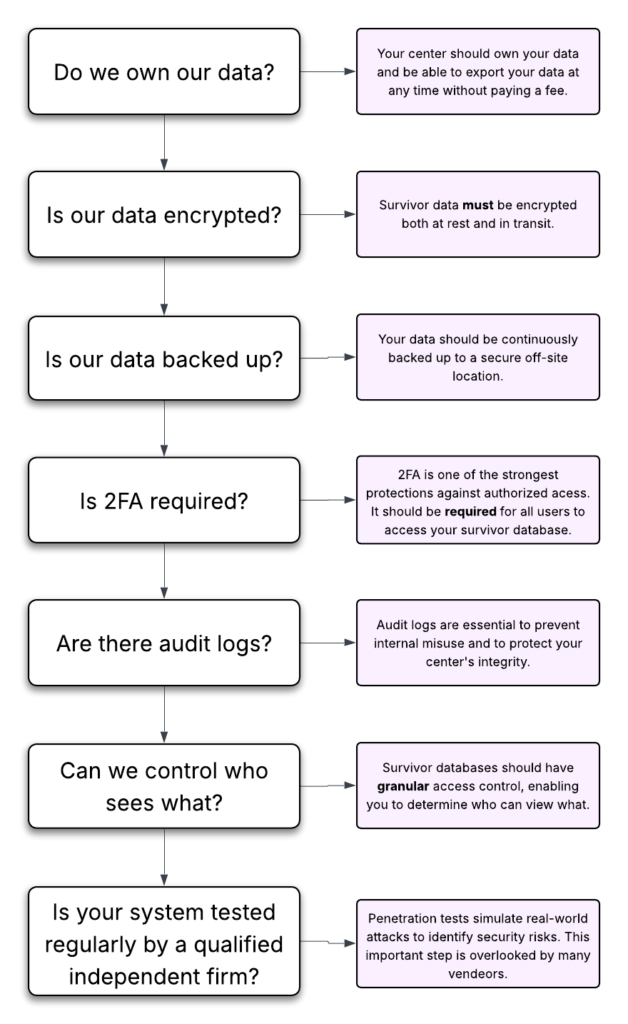
Before you sign a contract with a database vendor, here are some key questions you should ask:

Question 1: Do We Own Our Data?

This is foundational. You would be amazed how many database vendors think that they own your data and will charge you exorbitant fees to get your data back out. Worse still, many vendors will use your data for marketing purposes or share it with undisclosed third-party providers.

So ask directly:

  • Do we retain full ownership of our data?
  • Will you ever share our data with third parties?
  • Will you use our data for marketing purposes?
  • Will we pay a fee to retrieve our data if we change vendors?

It is critical that survivor data is not being shared, sold, or repurposed.

You should not have to pay a penalty to access your own records or feel locked into a system because leaving is expensive or technically difficult.

Your center should own its data — fully and clearly.

Question 2: Where Is Our Data Stored?

Security is not just about protection from hackers. It is also about protection from data loss and internal misuse.

Ask vendors:

  • Do you encrypt all survivor data in transit and at rest?
  • Do you regularly back up data to an off-site location, and do you encrypt those backups?
  • Will you store our data in a modern cloud-based system or an on-premises server?

It might seem unintuitive, but cloud-based systems are actually a better choice. Hard drives fail all the time. The cloud offers redundancy and state-of-the art physical access controls to keep your data safe from theft and loss.

You should understand both the technical protections and the human safeguards in place.

Question 3: Do You Require Two-Factor Authentication?

Requiring two-factor authentication (2FA) might be the single most important thing you can do to protect the victim data in your database from unauthorized access.

2FA is a simple security measure that asks users to enter a code sent to their phone or device to verify their identity while logging in. This is dramatically more secure than passwords alone because even if someone steals or guesses a password, they still cannot access the account without that second code.

Be sure ask:

  • Does your system require 2FA for all users?
  • Can users turn it off?
  • What 2FA methods do you support?

If you do not require 2FA for all users, that introduces a significant governance risk. Survivor data should never depend on voluntary security settings.

If you’re unsure what 2FA is or why it’s so important, check out our guide on two-factor authentication.

Question 4: Can We Control Who Sees Survivor Data?

Victim service organizations require layered confidentiality.

Ask:

  • Can we restrict access by role?
  • Can our volunteers view victim data?
  • Can we add restrictions directly to individual survivor records?

Consider this scenario:

What if someone who works at your center is also a survivor whose data is in your database?

How does the system prevent unauthorized staff from viewing that record?

Granular, role-based permissions — and the ability to restrict specific records — are essential.

Question 5: Do You Have Audit Logs?

Audit logs track activity inside the system.

Ask:

  • Can we see who viewed a record?
  • Can we see who edited or deleted data?
  • Can we track exports?

The risk is not only external attackers. It is also internal misuse.

If a malicious staff member deletes data, could you prove to a court, funder, or law enforcement agency what happened?

Audit logs provide accountability and evidence that no one has impromperly altered your data.

Question 6: Can We Disable Accounts?

You know far too well that staff turnover is extremely common in this line of work. You must have the ability to disable accounts when staff members and volunteers leave the organization or no longer need access.

Ask:

  • Can administrators disable accounts immediately and without contacting support?
  • Can we revoke access in real time?
  • Does revoking access also terminate current active sessions?

Delayed offboarding is one of the most common vulnerabilities in small organizations.

Question 7: What If There Is a Data Breach?

Every vendor should have a documented data breach plan.

Ask:

  • Do you have a written breach response process?
  • How quickly would we be notified?
  • Do you carry cybersecurity insurance?
  • Have you undergone independent security testing or audits?

You should never be learning about a breach response process for the first time during an actual breach.

Question 8: Do You Have Regular Security Assessments?

Ask:

  • Do you conduct regular penetration tests?
  • Does an independent third-party security firm conduct your security audits?
  • How often do you perform security assessments?
  • How do you document and remediate findings?

A penetration test simulates a real-world attack to identify weaknesses before someone malicious does. Independent testing helps verify that security protections are not just internal claims.

How Strive DB Keeps Your Data Secure

We built Strive DB specifically for the unique needs of victim service centers, with survivor confidentiality as a core design principle. Here is how Strive DB meets the security standards outlined above:

  • You own your data
    Your center retains full ownership of its records. We do not sell your data or use it for marketing purposes. There are no punitive fees to export your data if you choose to move to another system, and you can export data at any time.
  • Cloud-hosted, professionally managed infrastructure
    Strive DB is cloud-based, reducing the risks associated with on-premise servers such as hardware failure, theft, or missed security updates.
  • Encryption at rest and in transit
    We encrypt your data while being transmitted and while stored on servers. We also continuously backup data to offsite locations, and we encrypt our backups.
  • Strict internal access controls
    We tightly restrict access to production systems with strong security measures.
  • Mandatory two-factor authentication (2FA) and strong password requirements
    We require 2FA by default for all users, and we enforce minimum password length and complexity standards.
  • Granular role-based permissions and immediate account disabling
    Centers can control exactly who sees what — including restricting sensitive records. Administrators can revoke access instantly when staff leave without opening a support ticket.
  • Detailed audit logs
    We log all record views, edits, and key actions in a secure audit log, supporting accountability and documentation.
  • Independent security validation
    Strive DB undergoes annual independent penetration testing and has completed a third-party security audit conducted by Accorian, a leading cybersecurity firm.
  • Documented breach response plan and cybersecurity insurance
    We follow a formal incident response process and maintain current cybersecurity insurance.

Security is not an optional feature. We built security into the foundation of the platform.


Choosing a database is not just a software decision.

It is a confidentiality decision, a governance decision, and a risk management decision.

These questions help ensure survivor data is treated with the seriousness it deserves.