
Close

Zero-Knowledge Encryption for Victim Services Databases: What It Means and What Actually Keeps Survivor Data Safe

“Zero-knowledge encryption” is a phrase that is often misunderstood and sometimes misused in vendor marketing. And for most victim service organizations, this obscure security feature really doesn’t address the security risks that matter most in daily operations, even if implemented correctly.

In this article we’re going to demystify zero-knowledge encryption and explain why it’s probably not a feature you really want your database to have.

Some of this is going to get a little technical, but I’m going to do my best to break this down into simple terms. If you have any questions or need further guidance, please feel free to contact us or schedule a free consultation. We are happy to help.

Key Takeaways

  • Zero-knowledge encryption means the vendor cannot read your data because all encryption and decryption happens on your device — not the server. Very few case management databases achieve this in practice.
  • Many systems marketed as "zero-knowledge" actually use encryption at rest with a client-held key, which is a meaningful protection — but not the same thing.
  • For most DV/SA centers, the biggest daily security risks are internal access control, staff device security, and application vulnerabilities — not vendor access to data.
  • A comprehensive security posture includes granular permissions, mandatory MFA, independent penetration testing, audit trails, and modern infrastructure — not just encryption.

What Zero-Knowledge Encryption Actually Means

In a true zero-knowledge architecture, your data is encrypted on your device before it ever reaches the vendor’s server. The vendor stores only encrypted data and never possesses the key to decrypt it. The encryption and decryption happen entirely in your browser or application — not on the server.

This is how products like Signal (messaging) and Proton Mail (email) work. The server is a storage locker. It holds encrypted packages but has no way to open them.

For a case management database to be truly zero-knowledge, all of the following must be true:

  • Encryption happens client-side — in the browser, before data is transmitted to the server
  • Decryption happens client-side — the server sends encrypted data, and your browser decrypts it locally
  • The server never sees the encryption key — not in a cookie, not in a session, not in server memory
  • The server never processes plaintext data — search, reporting, and display all happen on encrypted data or after client-side decryption
  • If you lose the key, the data is gone — the vendor cannot recover it because they never had the ability to decrypt it

This is a high bar. It’s also an architecture that creates real trade-offs for the kind of work victim service organizations do.

Why True Zero-Knowledge Is Rare in Case Management Software

Building a truly zero-knowledge case management database is extraordinarily difficult. Here’s why: once data is encrypted so that the server can’t read it, the server also can’t search it, sort it, filter it, or generate reports from it. Every feature that makes a case management system useful — searching for a client by name, generating a VOCA report, filtering cases by service type — requires the server to read and process the data.

There are emerging cryptographic techniques (like homomorphic encryption and searchable encryption) that aim to solve this, but they are computationally expensive, still largely experimental for production applications, and not widely used in any commercial case management product today.

What Many Systems Actually Use: Encryption at Rest with a Client-Held Key

In practice, some systems that describe themselves as “zero-knowledge” actually use a different architecture:

  • Your data is encrypted when stored on the server’s hard drives
  • When you log in, your encryption key is sent to the server
  • The server uses your key to decrypt the data, processes it, and sends it back to your browser as readable information
  • When you log out, the server discards the key (ideally) and the data returns to its encrypted state on disk

Important Distinction: Encryption at rest with a client-held key is a legitimate and meaningful security measure. It protects data from physical theft of server hardware and from storage-layer breaches when no users are logged in. For many organizations, it’s a real upgrade over systems that store data unencrypted.

The concern arises only when this architecture is described as "zero-knowledge" — because the security guarantees are different. In a true zero-knowledge system, a compromised server reveals nothing. In an encryption-at-rest system, a compromised server during an active session could expose decrypted data, because the server is doing the decryption. Understanding the difference matters when you’re making decisions based on a vendor’s security claims.

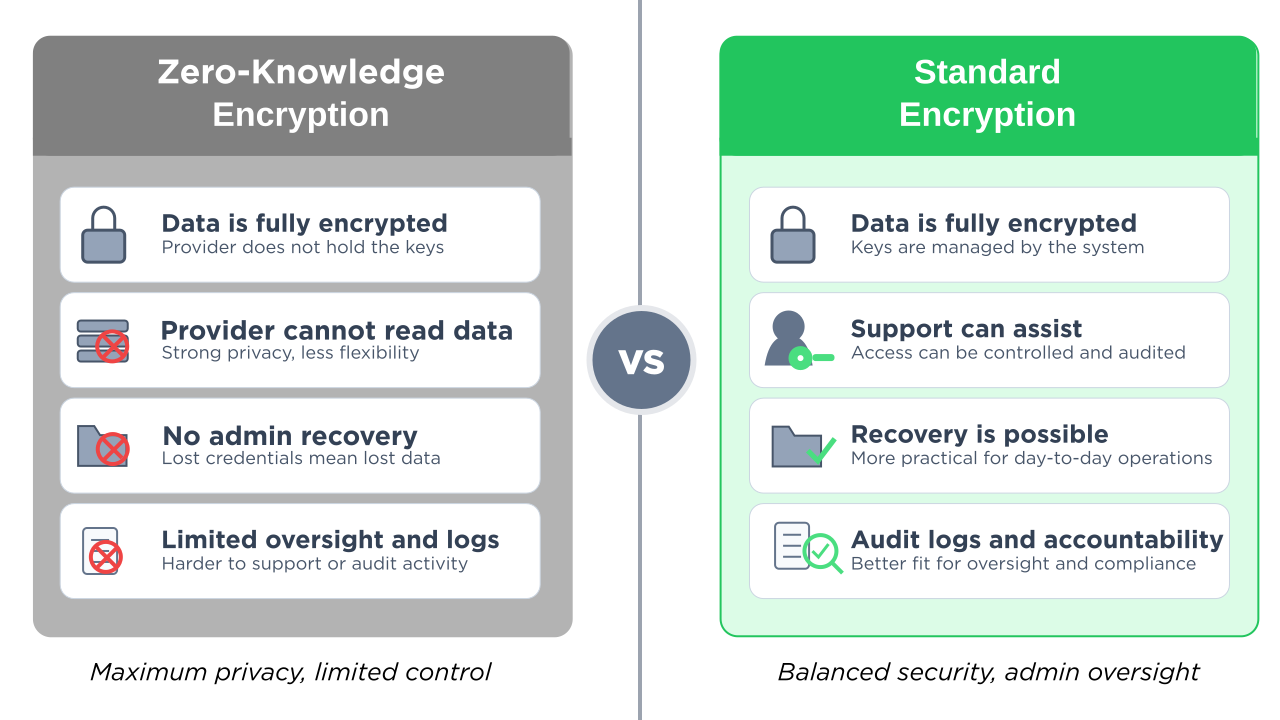
True Zero-Knowledge vs. Standard Encryption

Nearly every modern case management database encrypts data in transit and at rest — that’s table stakes. The question is whether a system goes further to implement true zero-knowledge, where the vendor is architecturally unable to read your data. Here’s how they compare:

True Zero-Knowledge Standard Encryption
Decryption location Your browser (client-side)Key never leaves your device On the serverServer decrypts during active sessions
Vendor can access data NoArchitecturally impossible YesGoverned by policy, not architecture
Search, filter, & reporting Very limitedServer can’t read the data Full functionality
Data recovery if key lost ImpossiblePermanently irrecoverable Recoverable
Storage-layer breach Strong Strong
Neither architecture protects against these threats
Internal access misuse Requires role-based permissions Requires role-based permissions
Application-level attacks Requires pen testing Requires pen testing
Stolen/lost devices Requires MFA & session timeouts Requires MFA & session timeouts
Available in VSO systems UnconfirmedClaimed but not verified YesStandard practice

The Key Insight: Notice the last five rows. Whether a system uses zero-knowledge encryption or standard encryption, neither architecture protects against the security risks DV/SA centers face most often: internal access misuse, application vulnerabilities, device theft, or subpoena exposure. Those threats require different protections — permissions, MFA, penetration testing, and audit trails. Encryption is one layer. It’s not the whole picture.

How to Verify a Vendor’s Encryption Claims

You don’t need to be a security expert to evaluate a vendor’s claims. Start by asking these three questions — and requesting documented, specific answers:

1. “Where does decryption happen — in my browser or on your server?”

If the vendor says “on the server,” it’s not zero-knowledge. In a true zero-knowledge system, encrypted data comes to your browser and is decrypted locally using JavaScript cryptography libraries (like the Web Crypto API).

2. “If I lose my encryption key, can you recover my data?”

If the answer is yes — or if there’s any recovery mechanism — the vendor has some form of access to the data or the key. True zero-knowledge means the vendor cannot recover your data if you lose the key. That’s the trade-off of the architecture.

3. “Does the encryption key ever leave my device?”

In a true zero-knowledge system, the key never travels to the server. If the key is stored in a browser cookie, sent as part of a login request, or transmitted to the server in any form, the server has access to it. Browser cookies, by design, are automatically sent to the server with every HTTP request.

For tech-savvy staff: If you want to verify these answers yourself, you can open your browser’s developer tools (right-click → Inspect → Network tab), use the system normally, and look at the server’s responses. If the server returns readable client names, addresses, and case details in the HTML or data responses, decryption is happening server-side — the server can read your data during active sessions. This is an optional step — the questions above should surface the information you need.

Protecting Data from the Vendor: A Legitimate Concern

Before we discuss the broader security picture, it’s important to acknowledge that protecting survivor data from vendor access is a real and legitimate concern. There have been cases across industries where vendor employees abused access to customer data. For organizations handling sensitive survivor information — safety plans, protective order details, forensic documentation — the question “can the software company’s employees see our clients’ data?” matters.

Encryption at rest with a client-held key does address this concern at a meaningful level: when no users are logged in, the vendor cannot read the data on their own servers. That’s a real security property and worth considering when choosing a platform.

The question for your organization is: is this the most important security risk you face, or one of several? For most DV/SA centers, the answer is the latter. And when you focus all of your security evaluation on a single feature, you may overlook vulnerabilities that are more likely to affect you in daily operations.

The Security Risks That Actually Keep VSO Leaders Up at Night

Even if a vendor implements flawless zero-knowledge encryption, it only addresses one threat vector: the vendor accessing your data without authorization. Here are the threats that DV/SA centers encounter far more frequently:

Internal access control

A volunteer accidentally seeing a counseling note they shouldn’t have access to. An intern browsing case files outside their caseload. A board member requesting data they’re not authorized to view. These are everyday risks at organizations with 10-50 staff and volunteers working across crisis services, legal advocacy, counseling, and administration.

Zero-knowledge encryption does nothing to prevent this. What prevents it: granular, role-based permissions that control exactly what each person can see based on their role — separating volunteer access from advocate access from counselor access from admin access.

Subpoena and legal exposure

When a court subpoenas your case records, encryption doesn’t help — the records will be decrypted for production regardless. The question becomes: which records exist, who can access them, and is there an audit trail showing they haven’t been tampered with? The ability to generate a compliant response — with documented chain of custody — matters more than how the data was stored. For guidance on responding to legal demands for records, see the National Network to End Domestic Violence’s Safety Net project.

Staff device security

An advocate leaves their laptop open at a coffee shop. A volunteer’s phone is stolen with an active session. A shared computer at the shelter doesn’t get logged out between users. These are the breach vectors that actually happen at under-resourced nonprofits.

What prevents this: mandatory multi-factor authentication, session timeouts, device-level access controls, and trusted browser management.

Application-level vulnerabilities

The most common way attackers breach web applications isn’t by stealing data off servers. It’s by exploiting vulnerabilities in the application itself — cross-site scripting (XSS), SQL injection, insecure dependencies. A database could have the strongest encryption in the world, but if the web application serving it runs on outdated libraries with known security vulnerabilities, the encryption is irrelevant.

What prevents this: regular penetration testing by independent security auditors, modern and maintained software dependencies, and proactive vulnerability management.

Audit and accountability

If something goes wrong — a record is accessed inappropriately, a file is modified, a case note disappears — you need to know what happened. Who accessed what, when, and from where?

What provides this: comprehensive audit trails that log every access and modification, tied to individual user accounts.

What “Security” Should Actually Mean for a Victim Services Database

Security for a DV/SA center is not a single feature. It’s a posture — a set of overlapping protections designed for the specific risks your organization faces. The Safety Net project at NNEDV emphasizes that choosing a database requires centering “confidentiality, security designs, privacy requirements, and guidelines as set forth by VAWA and FVPSA federal law.” That goes well beyond any one encryption method.

When evaluating any case management system, here’s what to ask about:

Your Security Evaluation Checklist

Encryption: Is data encrypted in transit (HTTPS/TLS) and at rest? What encryption standard? (AES-256 is the current industry standard.)

Access control: Can you create custom role groups that match your organizational structure? Can you separate what a volunteer sees from what a counselor sees from what a director sees? Can you restrict access to specific case types or individual records?

Authentication: Is multi-factor authentication (MFA) required — not just available, but required on every account? What MFA methods are supported?

Independent security verification: Has the system been audited by a named, independent security firm? Was a full penetration test conducted? Were the results published or available on request? A vendor that names their auditor and shares results is making a verifiable claim.

Audit trails: Does the system log who accessed which records and when? Can you review access history for compliance or incident investigation?

Confidential data collection: Can survivors provide feedback or complete forms without creating a digital trail that could be discovered by an abusive partner? Is the form collection mechanism designed with intimate partner violence dynamics in mind?

Modern infrastructure: Is the software built on current, maintained frameworks and libraries? When was the last dependency update? Are there known vulnerabilities in the technology stack?

For a deeper dive into vendor security questions, see our guide: Is Your Survivor Database Secure? The 8 Essential Questions to Ask.

How StriveDB Approaches Security

StriveDB was built specifically for victim service organizations — domestic violence shelters, sexual assault centers, and family justice centers. We don’t claim zero-knowledge encryption. What we do claim is independently verified, specific, and checkable:

  • Strong encryption — all data encrypted in transit (TLS 1.2+) and at rest (AES-256), the current industry standard
  • HIPAA-aligned architecture
  • Independent security audit by Accorian, a named third-party cybersecurity firm — including a full penetration test confirming no medium or higher vulnerabilities
  • Granular, customizable permissions that separate volunteer, advocate, counselor, and admin access — designed specifically for how victim service organizations are structured
  • Multi-factor authentication required by default on every account, every plan — using authenticator app, SMS, or email
  • Comprehensive audit trails logging access and modifications to client records
  • Anonymous, confidential survivor feedback surveys designed so survivors can provide input without creating a persistent digital trail
  • Modern technology stack with actively maintained dependencies and no known vulnerabilities

Beyond security, StriveDB is the most complete case management platform built specifically for VSOs — combining a dedicated legal advocacy module, a clinical counseling module with measurement-based care (PHQ-9, PCL-5), one-click VOCA reporting on every plan, volunteer management, and AI-powered paper form scanning. Plans start at $199/month with transparent, published pricing.

For more about how StriveDB protects data at every level, see Why Your Survivor Services Database Should Require 2FA and our guide to HMIS and survivor databases.

For a full picture of StriveDB’s security posture, please read our detailed, transparent security statement.

See How StriveDB's Security Works in Practice

Granular permissions, audit trails, mandatory 2FA, and confidential survivor surveys — built for how your organization actually works.

Book a Demo
What is zero-knowledge encryption in a case management database?

Zero-knowledge encryption means the vendor cannot read your data — encryption and decryption happen entirely on your device, and the server never possesses the key. In practice, very few case management systems achieve true zero-knowledge because it prevents the server from searching, filtering, or generating reports from the data. Some systems that use the term actually implement encryption at rest with a client-held key, which is a different architecture that still offers meaningful protection.

Is zero-knowledge encryption required for VOCA or VAWA compliance?

No. Neither VOCA nor VAWA require zero-knowledge encryption. VAWA requires that victim service providers maintain strict confidentiality of survivor personally identifying information and prohibits sharing PII without informed consent. These requirements can be met through strong access controls, role-based permissions, encryption in transit and at rest, and organizational security policies — without zero-knowledge encryption specifically.

How can I tell if a vendor's encryption is truly zero-knowledge?

Ask the vendor three questions: (1) Where does decryption happen — in my browser or on your server? (2) If I lose my encryption key, can you recover my data? (3) Does the encryption key ever leave my device? If decryption happens on the server, or if the vendor can recover lost keys, or if the key is transmitted to the server (including via browser cookies), then the system is not truly zero-knowledge — even if the vendor uses that term.

What security features matter most for a domestic violence shelter database?

For most DV/SA centers, the highest-impact security features are: granular role-based permissions (controlling who sees what within your organization), mandatory multi-factor authentication on every account, independent penetration testing by a named security firm with published results, comprehensive audit trails, and confidential data collection methods designed for intimate partner violence dynamics. Encryption is important but is one layer of a broader security posture.

Does StriveDB offer zero-knowledge encryption?

No. StriveDB is HIPAA-aligned and has been independently audited by Accorian, with a full penetration test confirming no medium or higher vulnerabilities. Our security approach prioritizes granular permissions designed for VSO organizational structures, mandatory MFA on every account from day one, comprehensive audit trails, and a modern technology stack — addressing the security risks DV/SA centers face most often in daily operations.

Bonterra Apricot Alternatives for DV/SA Centers: A Detailed Comparison with StriveDB

If you’re looking for Bonterra Apricot alternatives for your domestic violence shelter, sexual assault center, or family justice center, you’re probably weighing a familiar tradeoff: a platform you can configure for your work versus a platform designed for your work from day one.

Apricot is the biggest name in nonprofit case management — a powerful, flexible tool that thousands of organizations configure to fit their workflows across dozens of verticals. StriveDB is a newer, narrower option — a case management database designed exclusively for victim service organizations. Both can manage cases. The difference is in who does the work to make that happen: your team, or the software.

This article compares them side by side on features, pricing, security, support, and migration — with sources linked so you can verify everything yourself.

What Each Platform Is

Bonterra Apricot started in 1999 as a nonprofit outcomes tracking tool. It was acquired by Social Solutions in 2015, then became part of Bonterra under Apax Partners in 2021 — a private equity consolidation valued at roughly $2 billion. Now branded as “Bonterra Impact Management,” Apricot serves nonprofits in health and human services, education, workforce development, and more. It offers an extremely flexible drag-and-drop form builder, enterprise-grade security certifications (SOC 2 Type II, ISO 27001, HIPAA, FedRAMP Ready), and a large knowledge base with 526+ help articles. It holds 225+ reviews on Capterra averaging 4.2 out of 5.

StriveDB is a cloud-based case management database built from the ground up for victim service organizations — DV shelters, SA centers, and family justice centers. It is the only VSO database that combines a dedicated legal advocacy module, a clinical counseling module with measurement-based care and subpoena compliance workflows, one-click VOCA reporting on every plan, volunteer management, AI-powered paper form scanning, and anonymous survivor feedback surveys — all in one system with transparent pricing starting at $199/month.

StriveDB was developed in coordination with the Rape Crisis Center of Central New Mexico, a 53-year-old organization serving four counties with crisis intervention, counseling, and community education programs. The platform is independently founded, not backed by private equity, and is increasingly being adopted by family justice centers across the country. It is new to market with limited reviews — but it was built alongside the organizations it serves.

StriveDB vs. Apricot: Head-to-Head Comparison

Bonterra Apricot StriveDB
Overview
Built for All nonprofits Dozens of verticals — VSOs are one of many VSOs exclusively DV shelters, SA centers, family justice centers
Ownership Apax Partners Private equity ($2B portfolio) Independent Founder-led, not PE-backed
Market presence 225+ reviews Capterra 4.2/5 · 25+ years in market New to market Few public reviews · Built with the Rape Crisis Center of Central NM
Pricing & Support
Pricing transparency Quote only No published amounts · Per-user model Fully transparent Starts at $199/mo · Per-plan, not per-seat
Mid-size center cost
(~20 staff)
~$15,000–$40,000/yr Based on verified user reports · Before add-ons $6,240/yr Team plan · Training, consulting, VOCA included
Training included Not included Paid separately via Bonterra Academy 10 hrs/yr Included on Team plan
Consulting included Not included Third-party consultants at additional cost 10–20 hrs/yr Team (10 hrs) · Premium (20 hrs)
Support access Paid add-on Phone support billed in 30-min increments · Standard tier: 5 contacts/mo Direct access to StriveDB team Team+ · Email, video, and phone — no ticket limits or per-minute billing
Setup approach Self-service or consultant Blank platform + knowledge base Configured by StriveDB team White-glove setup on Team+
VSO-Specific Features
VOCA reporting Custom config required Or hire Treadwell Data (third-party consultant) One-click, all plans Included even on Basic at $199/mo
Legal advocacy Custom forms only Advocates build their own tracking Dedicated module SART tools · Protective orders · Police reports · $100/mo
Counseling Generic case notes No confirmed clinical instruments Dedicated module PHQ-9 · PCL-5 · Subpoena compliance · Approval workflows · $100/mo
AI paper form scanning Not available Dedicated module 1,000 scans/mo · $100/mo
Volunteer management Basic attendance tracking Timesheets + presentation logging
Survivor feedback Infrastructure exists No pre-built survey Built-in, customizable
Survivor-facing forms Connect Portal + texting Safety concern raised by DV shelter staff on TrustRadius QR-code forms Survivor-initiated · In-office · No digital trail · No push notifications
Security & Compliance
Certifications SOC 2 ISO 27001 FedRAMP HIPAA HIPAA-aligned Accorian audit · Full pen test · No medium+ vulnerabilities
MFA Pro+ only, optional All plans
Named audit firm Not published Accorian Results published
Migration & Compatibility
Data migration DIY or consultant Form-by-form CSV export · API is Enterprise-only Included (most cases) Complex: $2K–$10K · AI scanning accelerates import
HMIS Comparable Via AHS module HUD APR · ESG CAPER · PIT reports On roadmap
API Enterprise-only On roadmap

Apricot pricing and feature details sourced from bonterratech.com, Capterra, TrustRadius, GetApp, and Bonterra Help Center. StriveDB pricing as published at strivedb.com. All information current as of March 2026.

In a StriveDB vs. Apricot comparison, the core tradeoff is this: Apricot offers more flexibility as a general-purpose tool and holds stronger security certifications, while StriveDB offers purpose-built VSO modules, transparent pricing, included support and training, and one-click VOCA reporting on every plan — including Basic at $199 per month. StriveDB’s Team plan at $6,240 per year includes features that require third-party consultants or Enterprise-tier upgrades to achieve in Apricot.

Pricing: What You’ll Actually Pay

StriveDB publishes its pricing. Apricot does not. Here’s what we can tell you.

StriveDB pricing

PlanCostUsersKey inclusions
Basic $199/mo
$2,388/yr
Up to 2 staff VOCA reporting, smart search, calendar, 5 GB. Self-directed setup.
Team $520/mo
$6,240/yr
Up to 20 staff
Up to 100 volunteers
3 custom funder reports, 1 TB, custom forms, volunteer timesheets, roles & permissions, 10 hrs training, 10 hrs consulting. Configured by our team.
Premium $1,250/mo
$15,000/yr
Up to 100 staff
Unlimited volunteers
10 custom funder reports, 5 TB, premium support, 1 module free, 20 hrs consulting. Configured by our team.
Multi-Site Custom 100+ staff
Unlimited volunteers
Multiple tenants, cross-org reporting, enterprise SSO, custom domain.

Optional modules on Team plans and above: Counseling ($100/mo), Legal Advocacy ($100/mo), and Automated Data Entry ($100/mo for 1,000 scans, $0.25 per additional).

Apricot estimated pricing

Bonterra shows three tiers — Essentials, Pro, Enterprise — but does not publish dollar amounts. G2 confirms no pricing information has been provided. Based on verified user reports on TrustRadius and other platforms, small teams (5–10 users) report costs around $10,000/year, and mid-size organizations (20–40 users) report $15,000–$40,000/year. Pricing is per-user with annual contracts.

VOCA reporting, training, consulting, and setup assistance are additional costs beyond the subscription. Standard support is limited to 5 contacts per month, and phone support is a paid add-on billed in 30-minute increments.

On GetApp, Value for Money scored 3.9 out of 5 — the lowest of any dimension measured — and reviewers on Capterra, TrustRadius, and Software Advice independently report annual price increases.

Learn more about Apricot pricing →

StriveDB’s Team plan costs $520 per month ($6,240 per year) for up to 20 staff and 100 volunteers, with VOCA reporting, training, consulting, and setup included. Apricot does not publish pricing, but verified user reports suggest comparable team sizes pay $15,000 to $40,000 per year, with training, consulting, and VOCA configuration as additional expenses.

Total Cost of Ownership Calculator

Estimate your costs over time — adjust the inputs to match your organization

Important: Bonterra does not publish Apricot pricing. The Apricot estimates in this calculator are based on our best interpretation of verified user reviews on TrustRadius, Capterra, and other platforms. These are estimates only — all Apricot pricing must be quoted directly by Bonterra. Add-on costs (consulting, training, VOCA configuration) are conservative estimates based on typical consulting rates and Bonterra’s publicly documented support pricing. StriveDB pricing is as published at strivedb.com.
1204060

StriveDB optional modules:

Premium plan includes 1 module free (−$1,200/yr)

Include Apricot add-on costs? (Separate from subscription)

Apricot’s standard support tier is limited to 5 contacts/month. Phone support is a paid add-on.

StriveDB
Apricot

Apricot costs are estimates based on verified user reports — actual pricing requires a quote from Bonterra

Estimated 3-year savings with StriveDB

Annual cost breakdown

Line itemStriveDB TeamApricot Pro

Apricot subscription estimates

Bonterra does not publish pricing for Apricot. Our subscription estimates are derived from verified user reviews that mention cost:

  • Two independent TrustRadius reviewers reported costs of approximately $10,000/year for small teams of 5–10 users
  • Multiple Capterra and Software Advice reviewers describe costs as “expensive” and “rising annually” for mid-size organizations
  • ITQlick estimates ~$50/user/month based on third-party analysis
  • G2 confirms that Bonterra has not provided pricing information

We interpolated ranges between these data points based on team size. These are conservative midpoint estimates — actual costs may be higher or lower.

Add-on cost estimates

  • VOCA consultant setup ($3,000): Based on typical nonprofit technology consulting engagement rates for report configuration. Treadwell Data specializes in building VOCA reports within Apricot, indicating this is not an out-of-the-box capability.
  • VOCA maintenance ($500/yr): Conservative estimate for annual report updates when funder requirements change.
  • Configuration & consulting ($2,000–$5,000/yr): Based on the existence of specialized Apricot consultants (Sidekick Solutions, Treadwell Data) and the self-service nature of Apricot’s standard support tier.
  • Training ($1,500–$3,000/yr): Apricot offers paid Foundations Courses and Labs. No training hours are included in the subscription. Estimate based on 1–3 paid sessions per year.

All add-on costs are togglable — uncheck them to see the raw subscription comparison.

StriveDB pricing

StriveDB pricing is taken directly from the published pricing at strivedb.com. All plans are billed annually. Module costs ($100/month each) are added when selected.

Ease of Use: What Your Staff Will Experience Day to Day

Your staff will use this system every day — during crisis calls, client intakes, counseling sessions, and grant reporting deadlines. The interface matters.

Apricot’s Ease of Use score on Capterra/GetApp is 4.1 out of 5 — reasonable overall, but the lowest positive dimension after Value for Money. The pattern in reviews is consistent: basic data entry is straightforward, but the complexity ramps up fast once you move beyond simple forms.

On G2, multiple reviewers describe a steep initial learning curve for administrators. A Software Advice reviewer reported that the report-building toolbox uses extremely small text that doesn’t display full report titles or field names, with no way to enlarge it. Another noted that the system’s “intuitive nature could be better” and wished for “greater flow working within the system.” On the performance side, reviewers across platforms report random logouts during data entry, freezing errors, and delays where newly enrolled clients don’t appear in search results for hours.

The reporting experience draws particular frustration. A G2 reviewer described Results Reporting as “clunky to adopt,” with frequent load-time issues and lost work from not saving constantly. Another reviewer on Software Advice noted that building reports “can be confusing.” For VSOs where VOCA reporting isn’t optional, a confusing report builder isn’t a minor inconvenience — it’s a compliance risk.

StriveDB, on the other hand, was designed by UI/UX experts with the goal of reducing the time between opening the software and getting work done. The interface is modern, clean, and built around the workflows that DV/SA staff actually perform — logging a crisis call, scheduling a follow-up, pulling a VOCA report. VOCA reporting is a single click, not a custom-built report.

See what the interface looks like →

VSO-Specific Features: Configured vs. Built In

Apricot’s form builder is genuinely powerful — given enough time and configuration, you can build most workflows. The question for DV/SA centers is whether you should have to.

VOCA reporting: StriveDB includes one-click VOCA reporting on every plan. Apricot requires custom forms and reports, or a third-party consultant like Treadwell Data that specializes in building VOCA configurations within Apricot.

Legal advocacy: StriveDB’s dedicated module tracks protective orders, police reports, medical forensic exams, investigation status, and SART tools. In Apricot, advocates build custom forms to track the same information.

Counseling: StriveDB’s module includes secure session notes, validated clinical instruments (PHQ-9, PCL-5), approval workflows, and subpoena compliance packets. Apricot offers a Case Notes feature, but no confirmed pre-built clinical instruments or clinical approval workflows.

AI-powered data entry: StriveDB’s Automated Data Entry module scans paper forms and imports them directly. No other confirmed VSO-specific platform offers this capability.

Survivor-facing forms: This is where design philosophy matters most. Apricot offers Connect Portals and text messaging — standard SaaS engagement features. However, a DV shelter staff member wrote on TrustRadius that her organization cannot use the portal because it could expose survivors to their abusers. In IPV contexts, a text notification or login history on a shared phone can be dangerous.

StriveDB took a different approach: QR-code-based forms. Survivors scan a code in the office to fill out forms on their own device. No app to install, no account to create, no push notifications, no text history. The interaction is survivor-initiated and leaves no persistent digital trail. This was a deliberate design decision based on IPV safety dynamics, not a missing feature.

A separate TrustRadius review from a staff member at a 51–200 employee DV shelter noted that Apricot lacks the full functionality required to capture all the moving parts of running a shelter. Apricot is also absent from the OVC/NCJTC recommended case management systems list for victim service grantees.

Switching: What Migration Actually Looks Like

Apricot’s data export works form by form — no single export button. Attachments must be extracted individually. API access for automated extraction is Enterprise-only. And contract terms don’t allow mid-term reductions, so you’ll pay full price for both systems during any transition.

StriveDB takes a different approach. For most centers on Team plans and above, data migration is included at no additional cost. A consultation determines scope — complex situations involving large historical datasets or multiple legacy systems may cost $2,000 to $10,000, but that’s the exception. The AI-powered Automated Data Entry module can scan paper records (crisis logs, intake forms, case files) directly into the system, eliminating the most time-consuming part of any migration.

Team plans include 10 hours of training and 10 hours of consulting in year one. Your system is configured by StriveDB’s team — not handed to you as a blank platform.

StriveDB includes data migration at no additional cost for most centers on Team plans and above. Complex migrations may cost $2,000 to $10,000 depending on scope. The AI-powered Automated Data Entry module can scan and import paper forms directly into the system, eliminating manual data entry from historical records. No other confirmed VSO-specific platform offers AI-powered document scanning.

Where Apricot Has the Advantage

HMIS Comparable Database: Apricot offers HUD APR, ESG CAPER, and Point in Time reporting through its AHS module. StriveDB does not offer HMIS Comparable today — it’s on the roadmap. If your funding requires it, this is a real gap.

Security certifications: Apricot holds SOC 2 Type II, ISO 27001, and FedRAMP Ready. StriveDB is HIPAA-aligned with a clean pen test by a named firm (Accorian), but does not hold these certifications. If your funders require them specifically, Apricot meets that requirement.

Ecosystem maturity: Apricot has 225+ reviews, a training academy, a certification program, and third-party consultants who specialize in its platform. StriveDB is new with limited social proof.

General flexibility: If your organization serves populations beyond DV/SA survivors, Apricot’s generic form builder may be a better fit. StriveDB is built for VSOs specifically — that focus is a strength for the organizations it serves and a limitation for everyone else.

Language support: Apricot supports multiple languages. StriveDB’s architecture is built for multi-language support and Spanish is in active development, but translations are not yet complete. If your center requires full Spanish-language access today, ask about the timeline during your consultation.

Frequently Asked Questions

Is StriveDB a good alternative to Bonterra Apricot for domestic violence shelters?

StriveDB was built specifically for DV shelters, SA centers, and family justice centers. It offers dedicated legal advocacy and counseling modules, one-click VOCA reporting on all plans, AI-powered paper form scanning, and survivor feedback surveys — capabilities that Apricot either lacks or requires custom configuration to achieve. Pricing starts at $199 per month.

How much does StriveDB cost compared to Apricot?

StriveDB’s Team plan costs $520/month ($6,240/year) for up to 20 staff and 100 volunteers, with VOCA reporting, training, consulting, and setup included. Apricot does not publish pricing, but verified user reports suggest comparable team sizes pay $15,000 to $40,000 per year before additional costs.

Can I migrate my data from Apricot to StriveDB?

Yes. For most centers on Team plans and above, data migration is included at no additional cost. Complex migrations may cost $2,000 to $10,000. The AI-powered Automated Data Entry module can also scan and import paper records directly.

Does StriveDB support HMIS Comparable reporting?

Not currently. If you need HUD APR or ESG CAPER today, Apricot offers this through its AHS module. StriveDB has HMIS Comparable on the roadmap. If your primary funding is VOCA, OVW, or FVPSA, StriveDB has you covered with one-click reporting on every plan.

Is StriveDB secure enough for survivor data?

StriveDB was built from the ground up to handle sensitive survivor data. All data is encrypted at rest and in transit. An independent security audit by Accorian included a full penetration test and returned a clean report. Multi-factor authentication is enabled on all plans. Granular role-based permissions let you separate access levels. The platform is HIPAA-aligned and designed to comply with VOCA and VAWA confidentiality requirements. Read our security overview. Apricot holds additional certifications (SOC 2, ISO 27001, FedRAMP) that StriveDB does not — if your funders require those specifically, that’s worth noting.

StriveDB is new — why should I trust it?

That’s a fair question. StriveDB was developed in coordination with the Rape Crisis Center of Central New Mexico, a 53-year-old organization, and is increasingly being adopted by family justice centers nationally. It has an independently verified security posture, HIPAA alignment, and a team that configured every aspect of the platform for VSO workflows. It doesn’t have the review history that Apricot offers — weigh that against whether your current platform was built with your work in mind.

Next Steps

If you're evaluating Bonterra Apricot alternatives for your DV/SA center, we'll assess your migration scope, walk you through the platform, and show you how your workflows map to StriveDB. Want to talk to a center that's already made the switch? Ask us during your consultation.

Schedule a Free Consultation

Your Survivor Services Database Should Require 2FA

Many victim services case management databases do not require two-factor authentication (2FA). Some make it optional or bury it in settings. Some do not clearly explain whether it is enabled at all.

We think that’s a mistake. A big mistake.

If your center stores survivor data, requiring 2FA for every user is the single most important step you can take to reduce risk.

So what is 2FA and why should you care?

What Is Two-Factor Authentication?

Two-Factor Authentication (2FA), also known as Multi-Factor Authentication, is a simple security feature that adds one extra step when logging in.

Normally, logging in requires:

  • A username
  • A password

With 2FA, logging in requires:

  1. Your password
  2. A second code sent to your phone or generated by an app

That second code usually lasts about 30 seconds and changes constantly.

Even if someone knows your password, they cannot log in without that second code.

Why Passwords Alone Don’t Protect You

It is easy to assume:

“We use strong passwords. We’re fine.”

Unfortunately, that is not how most breaches happen.

Here are the most common ways passwords get compromised:

1. Phishing Emails

A staff member receives an email that looks like it came from Microsoft or Google. They click a link and enter their password into a fake login page.

2. Password Reuse

Someone uses the same password on multiple sites. One of those sites gets hacked. The attacker tries that password on your email or database — and it works.

3. Shared Passwords

Multiple staff members use the same login. A former employee still knows it.

4. Simple Guessing

Weak passwords are still common, especially in small teams.

Once an attacker gets into a single email account, they can:

  • Reset other passwords
  • Access your case management system
  • Download reports
  • Impersonate staff

Passwords alone are no longer enough.

Why This Is a Survivor Safety Issue

Your center likely stores:

  • Safety plans
  • Protective order documentation
  • Shelter locations
  • Immigration records
  • Forensic exam information

Guidance from the Office for Victims of Crime and the Office on Violence Against Women emphasizes strict confidentiality protections.

The National Network to End Domestic Violence also highlights account security as a core part of protecting survivor data.

If a staff login is compromised, confidentiality can be exposed quickly.

Two-factor authentication dramatically lowers that risk.

What 2FA Looks Like in Real Life

Here is a typical example:

  1. You enter your password.
  2. Your phone shows a six-digit code.
  3. You type in that code.
  4. You are logged in.

That is it.

It adds about 10–15 seconds to the login process.

It can prevent days — or weeks — of crisis management after a breach.

2FA Should Not Be Optional

If 2FA is optional, some staff will enable it and others will not.

All it takes is one unprotected account to create exposure.

At Strive DB, we require 2FA for all users because we believe survivor data deserves mandatory protection, not voluntary settings.

If your database allows users to skip 2FA, contact your provider and ask:

  • Is 2FA available?
  • Can we require it for all users?
  • How do we turn it on center-wide?

This should be treated as a basic safety standard.

Which Type of 2FA Should You Use?

There are three common methods:

1. Authenticator Apps (Recommended)

These apps generate secure codes on your phone.

Two strong options are:

  • 2FAS Auth — allows organizing and searching your codes.
  • Proton Pass — includes a browser extension that can store passwords and automatically fill 2FA codes on supported sites.

Authenticator apps are more secure than text messages.

2. Text Message (SMS)

When you login, you will receive code sent via text.

This is easier to set up but slightly less secure than an authenticator app. It is still far better than having no 2FA.

3. Email-Based Codes

When you login, you receive a code in your e-mail.

This is often used as a default option. It improves security, but if email itself is compromised, protection may be weakened.

Authenticator apps are generally the strongest choice.

Final Thought

You do not need an IT department to improve your center’s security.

If you take only one step this year to protect survivor data, require two-factor authentication for every staff account.

HMIS or a Victim Services Database? You May Need Both.

If you operate a domestic violence shelter, rape crisis center, or family justice center, then you have likely been told you need to be “HMIS-compliant.”

You may also be wondering:

  • Can HMIS handle all of our data?
  • Should we put all survivor information into HMIS?
  • Do we really need a separate survivor database?

The short answer: HMIS and survivor case management databases serve different purposes. Because of that, most victim service centers that provide housing need both.

Specifically, HUD created HMIS to be a community-wide system for HUD-funded housing programs. Meanwhile, VOCA, VAWA, and FVPSA specifically prohibit victim service providers from entering survivor PII into HMIS. Instead, VSPs receiving CoC or ESG funding must use a separate HMIS Comparable Database, while also maintaining a dedicated case management system for advocacy, legal services, counseling, and VOCA/FVPSA grant reporting.

Let’s unpack that a bit:

What Is HMIS?

U.S. Department of Housing and Urban Development requires most federally funded homeless service providers to use a Homeless Management Information System (HMIS).

The core functions of HMIS include:

  • Tracking housing and homelessness services
  • Standardizing data across communities
  • Supporting Continuum of Care (CoC) reporting
  • Generating HUD-required reports

Its purpose is system-level coordination and housing outcomes.

For organizations receiving HUD funding, HMIS participation is mandatory unless you qualify as a victim service provider with a comparable database.

What Is a Survivor Database?

On the other hand, the core function of survivor database (sometimes called a victim services case management system) is to track:

  • Crisis advocacy
  • Safety planning
  • Forensic accompaniment
  • Legal advocacy
  • Counseling services
  • VOCA and state grant reporting
  • Confidential recordkeeping

Additionally, these systems are designed around confidentiality, trauma-informed workflows, and funder reporting requirements outside of HUD.

When to Use HMIS Or Victim Services Database (Flowchart)

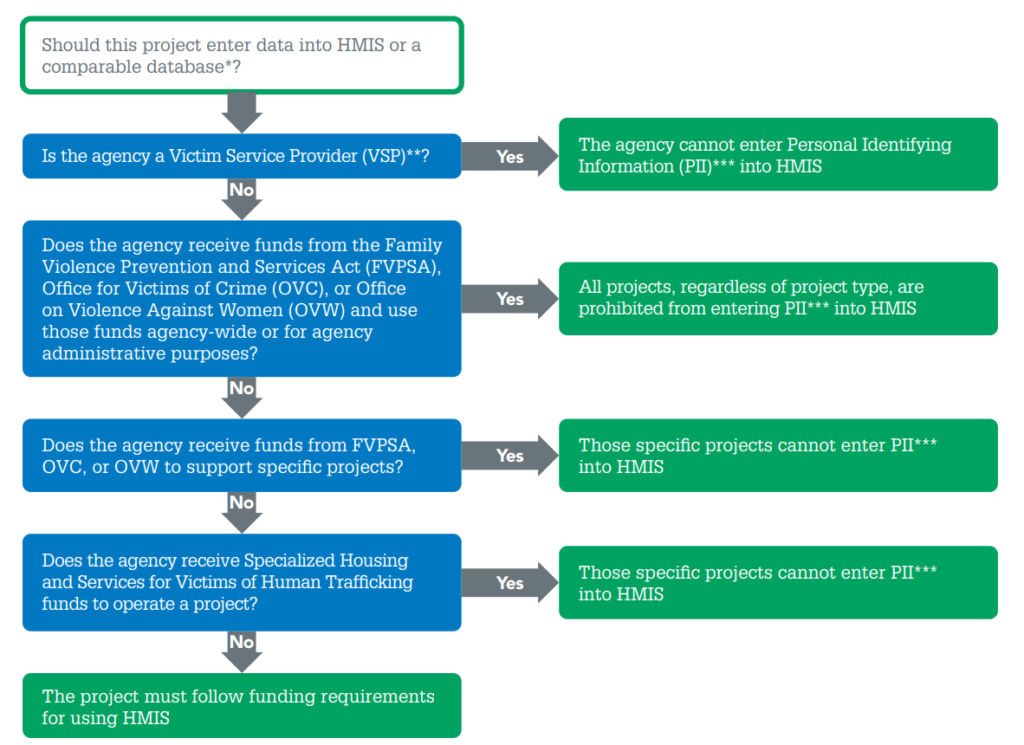
The Department of Housing and Urban Development published the decision tree below to help Victim Service Providers decide whether or not to enter Personal Identifying Information (PII) into HMIS.

To sum up the key takeaway: You shouldn’t put Victim PII into HMIS without informed consent.

A flow chart to determine if you should use HMIS or a victim services database like Strive DB.

Why You Should Not Put Survivor Data into HMIS

HUD explicitly recognizes that victim service providers have heightened confidentiality requirements under:

Because of this, many domestic violence and sexual assault programs are either:

  • Prohibited from entering identifying information into HMIS
  • Or required to use a comparable database instead

Even when technically permitted, there are strong reasons not to use HMIS as your primary survivor database:

1. Confidentiality Risk

Before moving on, it’s important to understand that HMIS systems are community-wide databases. That is, multiple agencies may access the system.

Despite having permissions controls, the structure of HMIS is built for coordinated housing systems — not survivor-level confidentiality.

For guidance on survivor technology safety, organizations often rely on resources like National Network to End Domestic Violence and their Safety Net project at techsafety.org.

2. Limited Advocacy Workflows

HMIS is built for housing metrics:

  • Entry/exit dates
  • Income
  • Housing status
  • Bed utilization

It is not built for:

  • Protective order tracking
  • Detailed advocacy notes
  • Accompaniment documentation
  • Complex legal case workflows

Accordingly, trying to force advocacy services into this system results:

  • Incomplete records
  • Shadow spreadsheets
  • Staff frustration

3. Reporting Gaps

To emphasize it: HUD reporting ≠ VOCA reporting.

Your funders may require:

  • Unduplicated survivor counts
  • Demographics by victimization type
  • Service hours
  • Legal outcomes
  • Protective order tracking
  • Sexual assault forensic exam accompaniment

But HUD systems do not natively handle most of these.

Why You May Need Both

For many organizations:

  • HMIS = Required for housing funding
  • Survivor Database = Required for advocacy, legal, and grant reporting

Despite their similarities, they solve different problems.

HMISSurvivor Database
Community-wideAgency-controlled
Housing-focusedSurvivor-focused
HUD reportingVOCA, FVPSA, state reporting
Limited confidentiality controlsBuilt for survivor confidentiality

Trying to consolidate everything into one system typically creates more compliance and security risk — not less.

What About Comparable Databases?

Victim service providers that receive HUD funds but cannot use HMIS directly must use a “comparable database.”

In order to be considered a “comparable” database, a solution must:

  • Collect all required HUD data elements
  • Maintain equivalent security standards
  • Produce HUD-compliant reports
  • Protect survivor confidentiality

However, many comparable databases still struggle to meet the broader reporting needs of rape crisis centers and domestic violence programs.

Where Strive DB Fits

StriveDB was built in collaboration with the Rape Crisis Center of Central New Mexico specifically to:

Because StriveDB was built to store sensitive victim data, it is not a replacement for housing systems.

Instead, it is a purpose-built survivor case management system designed to handle:

  • Advocacy
  • Legal services
  • Forensic accompaniment
  • Complex grant reporting

For many agencies, the right structure is:

HMIS for housing + Strive DB for survivor advocacy.


The Bottom Line

To sum up: HMIS was designed for housing systems while survivor databases were designed for victim services.

They are not interchangeable.

If your team is struggling with:

  • Overly complex reporting
  • Data privacy concerns
  • Incomplete survivor records
  • Duplicate data entry
  • HUD vs VOCA reporting confusion

Then it may be time to clearly separate the roles of your systems.

Is Your Survivor Database Secure? The 8 Essential Questions to Ask

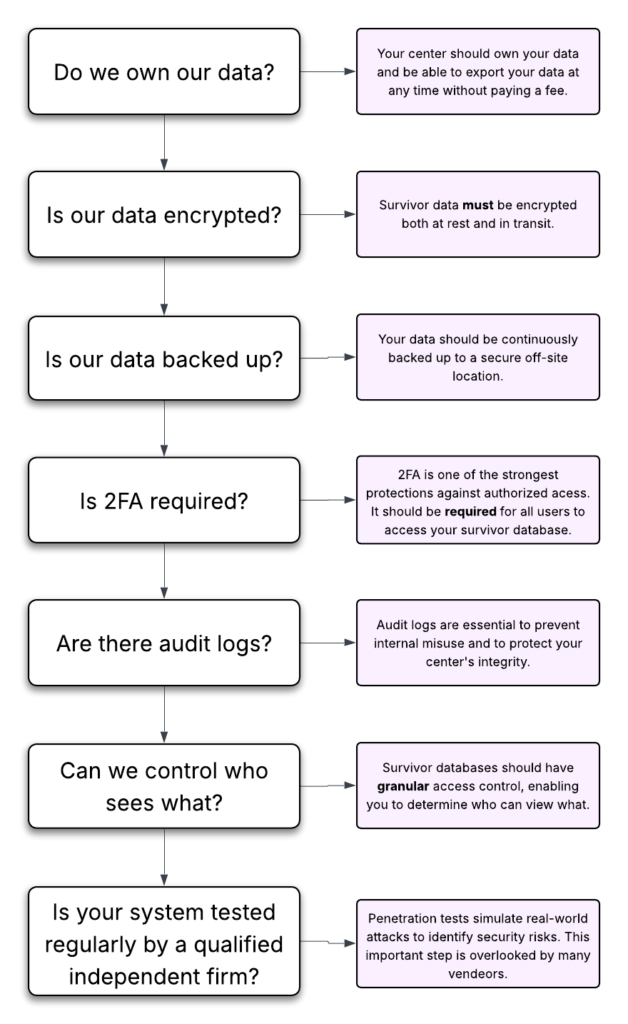
Important questions to ask when determining if your survivor database is really secure. Do you own your data? Is your data encrypted and backed up? Do you require 2FA? Are there audit logs?

Sexual Assault Centers, Domestic Violence Shelters, and Family Justice Centers store extremely sensitive data, such as safety plans, protective orders, forensic documentation, immigration details, and confidential communications. The system you choose must be built to protect that information.

And if your center receives federal funds from VOCA, VAWA, or FVPSA, then you are actually required by law to choose a database that adheres to strict confidentiality requirements. Many vendors do not meet those requirements.

Before you sign a contract with a database vendor, here are some key questions you should ask:

Question 1: Do We Own Our Data?

This is foundational. You would be amazed how many database vendors think that they own your data and will charge you exorbitant fees to get your data back out. Worse still, many vendors will use your data for marketing purposes or share it with undisclosed third-party providers.

So ask directly:

  • Do we retain full ownership of our data?
  • Will you ever share our data with third parties?
  • Will you use our data for marketing purposes?
  • Will we pay a fee to retrieve our data if we change vendors?

It is critical that survivor data is not being shared, sold, or repurposed.

You should not have to pay a penalty to access your own records or feel locked into a system because leaving is expensive or technically difficult.

Your center should own its data — fully and clearly.

Question 2: Where Is Our Data Stored?

Security is not just about protection from hackers. It is also about protection from data loss and internal misuse.

Ask vendors:

  • Do you encrypt all survivor data in transit and at rest?
  • Do you regularly back up data to an off-site location, and do you encrypt those backups?
  • Will you store our data in a modern cloud-based system or an on-premises server?

It might seem unintuitive, but cloud-based systems are actually a better choice. Hard drives fail all the time. The cloud offers redundancy and state-of-the art physical access controls to keep your data safe from theft and loss.

You should understand both the technical protections and the human safeguards in place.

Question 3: Do You Require Two-Factor Authentication?

Requiring two-factor authentication (2FA) might be the single most important thing you can do to protect the victim data in your database from unauthorized access.

2FA is a simple security measure that asks users to enter a code sent to their phone or device to verify their identity while logging in. This is dramatically more secure than passwords alone because even if someone steals or guesses a password, they still cannot access the account without that second code.

Be sure ask:

  • Does your system require 2FA for all users?
  • Can users turn it off?
  • What 2FA methods do you support?

If you do not require 2FA for all users, that introduces a significant governance risk. Survivor data should never depend on voluntary security settings.

If you’re unsure what 2FA is or why it’s so important, check out our guide on two-factor authentication.

Question 4: Can We Control Who Sees Survivor Data?

Victim service organizations require layered confidentiality.

Ask:

  • Can we restrict access by role?
  • Can our volunteers view victim data?
  • Can we add restrictions directly to individual survivor records?

Consider this scenario:

What if someone who works at your center is also a survivor whose data is in your database?

How does the system prevent unauthorized staff from viewing that record?

Granular, role-based permissions — and the ability to restrict specific records — are essential.

Question 5: Do You Have Audit Logs?

Audit logs track activity inside the system.

Ask:

  • Can we see who viewed a record?
  • Can we see who edited or deleted data?
  • Can we track exports?

The risk is not only external attackers. It is also internal misuse.

If a malicious staff member deletes data, could you prove to a court, funder, or law enforcement agency what happened?

Audit logs provide accountability and evidence that no one has impromperly altered your data.

Question 6: Can We Disable Accounts?

You know far too well that staff turnover is extremely common in this line of work. You must have the ability to disable accounts when staff members and volunteers leave the organization or no longer need access.

Ask:

  • Can administrators disable accounts immediately and without contacting support?
  • Can we revoke access in real time?
  • Does revoking access also terminate current active sessions?

Delayed offboarding is one of the most common vulnerabilities in small organizations.

Question 7: What If There Is a Data Breach?

Every vendor should have a documented data breach plan.

Ask:

  • Do you have a written breach response process?
  • How quickly would we be notified?
  • Do you carry cybersecurity insurance?
  • Have you undergone independent security testing or audits?

You should never be learning about a breach response process for the first time during an actual breach.

Question 8: Do You Have Regular Security Assessments?

Ask:

  • Do you conduct regular penetration tests?
  • Does an independent third-party security firm conduct your security audits?
  • How often do you perform security assessments?
  • How do you document and remediate findings?

A penetration test simulates a real-world attack to identify weaknesses before someone malicious does. Independent testing helps verify that security protections are not just internal claims.

How Strive DB Keeps Your Data Secure

We built Strive DB specifically for the unique needs of victim service centers, with survivor confidentiality as a core design principle. Here is how Strive DB meets the security standards outlined above:

  • You own your data
    Your center retains full ownership of its records. We do not sell your data or use it for marketing purposes. There are no punitive fees to export your data if you choose to move to another system, and you can export data at any time.
  • Cloud-hosted, professionally managed infrastructure
    Strive DB is cloud-based, reducing the risks associated with on-premise servers such as hardware failure, theft, or missed security updates.
  • Encryption at rest and in transit
    We encrypt your data while being transmitted and while stored on servers. We also continuously backup data to offsite locations, and we encrypt our backups.
  • Strict internal access controls
    We tightly restrict access to production systems with strong security measures.
  • Mandatory two-factor authentication (2FA) and strong password requirements
    We require 2FA by default for all users, and we enforce minimum password length and complexity standards.
  • Granular role-based permissions and immediate account disabling
    Centers can control exactly who sees what — including restricting sensitive records. Administrators can revoke access instantly when staff leave without opening a support ticket.
  • Detailed audit logs
    We log all record views, edits, and key actions in a secure audit log, supporting accountability and documentation.
  • Independent security validation
    Strive DB undergoes annual independent penetration testing and has completed a third-party security audit conducted by Accorian, a leading cybersecurity firm.
  • Documented breach response plan and cybersecurity insurance
    We follow a formal incident response process and maintain current cybersecurity insurance.

Security is not an optional feature. We built security into the foundation of the platform.

For more on how StriveDB keeps your data secure, please read our transparent, comprehensive security statement.

Choosing a database is not just a software decision. It is a confidentiality decision, a governance decision, and a risk management decision.

These questions help ensure survivor data is treated with the seriousness it deserves.