
“Zero-knowledge encryption” is a phrase that is often misunderstood and sometimes misused in vendor marketing. And for most victim service organizations, this obscure security feature really doesn’t address the security risks that matter most in daily operations, even if implemented correctly.
In this article we’re going to demystify zero-knowledge encryption and explain why it’s probably not a feature you really want your database to have.
Some of this is going to get a little technical, but I’m going to do my best to break this down into simple terms. If you have any questions or need further guidance, please feel free to contact us or schedule a free consultation. We are happy to help.
Key Takeaways
- Zero-knowledge encryption means the vendor cannot read your data because all encryption and decryption happens on your device — not the server. Very few case management databases achieve this in practice.
- Many systems marketed as "zero-knowledge" actually use encryption at rest with a client-held key, which is a meaningful protection — but not the same thing.
- For most DV/SA centers, the biggest daily security risks are internal access control, staff device security, and application vulnerabilities — not vendor access to data.
- A comprehensive security posture includes granular permissions, mandatory MFA, independent penetration testing, audit trails, and modern infrastructure — not just encryption.
What Zero-Knowledge Encryption Actually Means
In a true zero-knowledge architecture, your data is encrypted on your device before it ever reaches the vendor’s server. The vendor stores only encrypted data and never possesses the key to decrypt it. The encryption and decryption happen entirely in your browser or application — not on the server.
This is how products like Signal (messaging) and Proton Mail (email) work. The server is a storage locker. It holds encrypted packages but has no way to open them.
For a case management database to be truly zero-knowledge, all of the following must be true:
- Encryption happens client-side — in the browser, before data is transmitted to the server
- Decryption happens client-side — the server sends encrypted data, and your browser decrypts it locally
- The server never sees the encryption key — not in a cookie, not in a session, not in server memory
- The server never processes plaintext data — search, reporting, and display all happen on encrypted data or after client-side decryption
- If you lose the key, the data is gone — the vendor cannot recover it because they never had the ability to decrypt it
This is a high bar. It’s also an architecture that creates real trade-offs for the kind of work victim service organizations do.
Why True Zero-Knowledge Is Rare in Case Management Software
Building a truly zero-knowledge case management database is extraordinarily difficult. Here’s why: once data is encrypted so that the server can’t read it, the server also can’t search it, sort it, filter it, or generate reports from it. Every feature that makes a case management system useful — searching for a client by name, generating a VOCA report, filtering cases by service type — requires the server to read and process the data.
There are emerging cryptographic techniques (like homomorphic encryption and searchable encryption) that aim to solve this, but they are computationally expensive, still largely experimental for production applications, and not widely used in any commercial case management product today.
What Many Systems Actually Use: Encryption at Rest with a Client-Held Key
In practice, some systems that describe themselves as “zero-knowledge” actually use a different architecture:
- Your data is encrypted when stored on the server’s hard drives
- When you log in, your encryption key is sent to the server
- The server uses your key to decrypt the data, processes it, and sends it back to your browser as readable information
- When you log out, the server discards the key (ideally) and the data returns to its encrypted state on disk
Important Distinction: Encryption at rest with a client-held key is a legitimate and meaningful security measure. It protects data from physical theft of server hardware and from storage-layer breaches when no users are logged in. For many organizations, it’s a real upgrade over systems that store data unencrypted.
The concern arises only when this architecture is described as "zero-knowledge" — because the security guarantees are different. In a true zero-knowledge system, a compromised server reveals nothing. In an encryption-at-rest system, a compromised server during an active session could expose decrypted data, because the server is doing the decryption. Understanding the difference matters when you’re making decisions based on a vendor’s security claims.
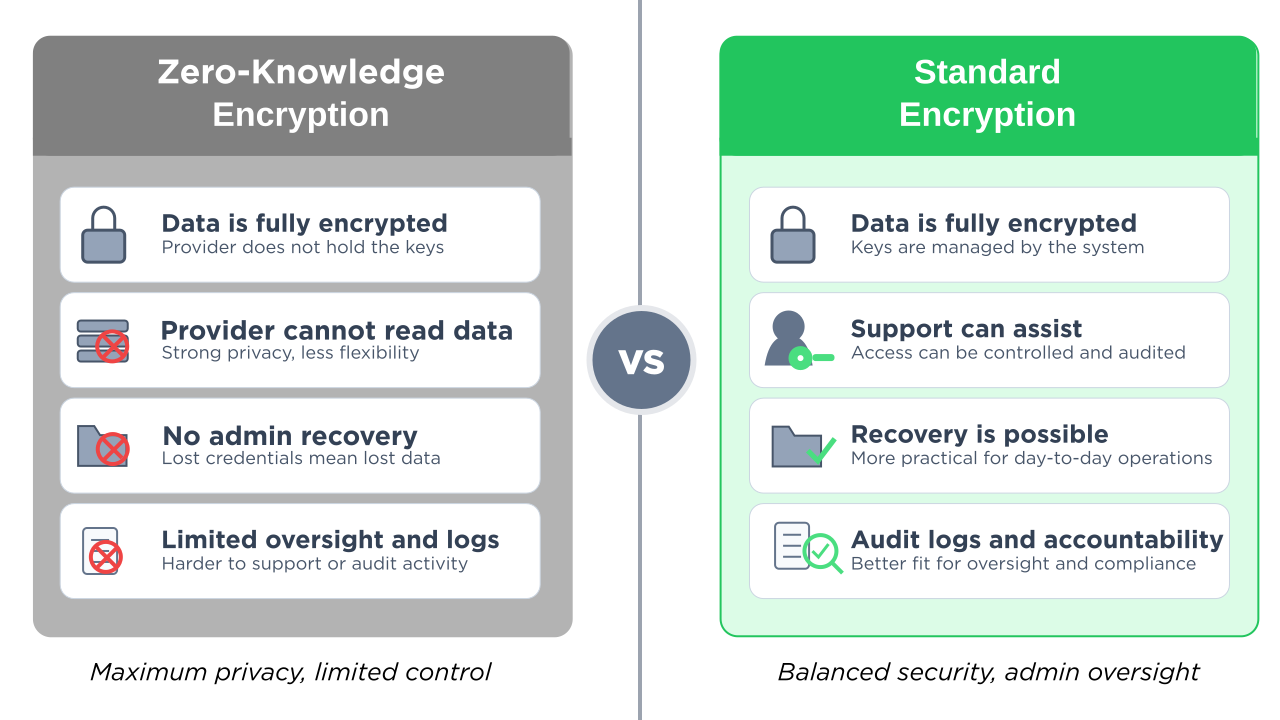
True Zero-Knowledge vs. Standard Encryption
Nearly every modern case management database encrypts data in transit and at rest — that’s table stakes. The question is whether a system goes further to implement true zero-knowledge, where the vendor is architecturally unable to read your data. Here’s how they compare:
| True Zero-Knowledge | Standard Encryption | |
|---|---|---|
| Decryption location | Your browser (client-side)Key never leaves your device | On the serverServer decrypts during active sessions |
| Vendor can access data | NoArchitecturally impossible | YesGoverned by policy, not architecture |
| Search, filter, & reporting | Very limitedServer can’t read the data | Full functionality |
| Data recovery if key lost | ImpossiblePermanently irrecoverable | Recoverable |
| Storage-layer breach | Strong | Strong |
| Neither architecture protects against these threats | ||
| Internal access misuse | —Requires role-based permissions | —Requires role-based permissions |
| Application-level attacks | —Requires pen testing | —Requires pen testing |
| Stolen/lost devices | —Requires MFA & session timeouts | —Requires MFA & session timeouts |
| Available in VSO systems | UnconfirmedClaimed but not verified | YesStandard practice |
The Key Insight: Notice the last five rows. Whether a system uses zero-knowledge encryption or standard encryption, neither architecture protects against the security risks DV/SA centers face most often: internal access misuse, application vulnerabilities, device theft, or subpoena exposure. Those threats require different protections — permissions, MFA, penetration testing, and audit trails. Encryption is one layer. It’s not the whole picture.
How to Verify a Vendor’s Encryption Claims
You don’t need to be a security expert to evaluate a vendor’s claims. Start by asking these three questions — and requesting documented, specific answers:
1. “Where does decryption happen — in my browser or on your server?”
If the vendor says “on the server,” it’s not zero-knowledge. In a true zero-knowledge system, encrypted data comes to your browser and is decrypted locally using JavaScript cryptography libraries (like the Web Crypto API).
2. “If I lose my encryption key, can you recover my data?”
If the answer is yes — or if there’s any recovery mechanism — the vendor has some form of access to the data or the key. True zero-knowledge means the vendor cannot recover your data if you lose the key. That’s the trade-off of the architecture.
3. “Does the encryption key ever leave my device?”
In a true zero-knowledge system, the key never travels to the server. If the key is stored in a browser cookie, sent as part of a login request, or transmitted to the server in any form, the server has access to it. Browser cookies, by design, are automatically sent to the server with every HTTP request.
For tech-savvy staff: If you want to verify these answers yourself, you can open your browser’s developer tools (right-click → Inspect → Network tab), use the system normally, and look at the server’s responses. If the server returns readable client names, addresses, and case details in the HTML or data responses, decryption is happening server-side — the server can read your data during active sessions. This is an optional step — the questions above should surface the information you need.
Protecting Data from the Vendor: A Legitimate Concern
Before we discuss the broader security picture, it’s important to acknowledge that protecting survivor data from vendor access is a real and legitimate concern. There have been cases across industries where vendor employees abused access to customer data. For organizations handling sensitive survivor information — safety plans, protective order details, forensic documentation — the question “can the software company’s employees see our clients’ data?” matters.
Encryption at rest with a client-held key does address this concern at a meaningful level: when no users are logged in, the vendor cannot read the data on their own servers. That’s a real security property and worth considering when choosing a platform.
The question for your organization is: is this the most important security risk you face, or one of several? For most DV/SA centers, the answer is the latter. And when you focus all of your security evaluation on a single feature, you may overlook vulnerabilities that are more likely to affect you in daily operations.
The Security Risks That Actually Keep VSO Leaders Up at Night
Even if a vendor implements flawless zero-knowledge encryption, it only addresses one threat vector: the vendor accessing your data without authorization. Here are the threats that DV/SA centers encounter far more frequently:
Internal access control
A volunteer accidentally seeing a counseling note they shouldn’t have access to. An intern browsing case files outside their caseload. A board member requesting data they’re not authorized to view. These are everyday risks at organizations with 10-50 staff and volunteers working across crisis services, legal advocacy, counseling, and administration.
Zero-knowledge encryption does nothing to prevent this. What prevents it: granular, role-based permissions that control exactly what each person can see based on their role — separating volunteer access from advocate access from counselor access from admin access.
Subpoena and legal exposure
When a court subpoenas your case records, encryption doesn’t help — the records will be decrypted for production regardless. The question becomes: which records exist, who can access them, and is there an audit trail showing they haven’t been tampered with? The ability to generate a compliant response — with documented chain of custody — matters more than how the data was stored. For guidance on responding to legal demands for records, see the National Network to End Domestic Violence’s Safety Net project.
Staff device security
An advocate leaves their laptop open at a coffee shop. A volunteer’s phone is stolen with an active session. A shared computer at the shelter doesn’t get logged out between users. These are the breach vectors that actually happen at under-resourced nonprofits.
What prevents this: mandatory multi-factor authentication, session timeouts, device-level access controls, and trusted browser management.
Application-level vulnerabilities
The most common way attackers breach web applications isn’t by stealing data off servers. It’s by exploiting vulnerabilities in the application itself — cross-site scripting (XSS), SQL injection, insecure dependencies. A database could have the strongest encryption in the world, but if the web application serving it runs on outdated libraries with known security vulnerabilities, the encryption is irrelevant.
What prevents this: regular penetration testing by independent security auditors, modern and maintained software dependencies, and proactive vulnerability management.
Audit and accountability
If something goes wrong — a record is accessed inappropriately, a file is modified, a case note disappears — you need to know what happened. Who accessed what, when, and from where?
What provides this: comprehensive audit trails that log every access and modification, tied to individual user accounts.
What “Security” Should Actually Mean for a Victim Services Database
Security for a DV/SA center is not a single feature. It’s a posture — a set of overlapping protections designed for the specific risks your organization faces. The Safety Net project at NNEDV emphasizes that choosing a database requires centering “confidentiality, security designs, privacy requirements, and guidelines as set forth by VAWA and FVPSA federal law.” That goes well beyond any one encryption method.
When evaluating any case management system, here’s what to ask about:
Your Security Evaluation Checklist
Encryption: Is data encrypted in transit (HTTPS/TLS) and at rest? What encryption standard? (AES-256 is the current industry standard.)
Access control: Can you create custom role groups that match your organizational structure? Can you separate what a volunteer sees from what a counselor sees from what a director sees? Can you restrict access to specific case types or individual records?
Authentication: Is multi-factor authentication (MFA) required — not just available, but required on every account? What MFA methods are supported?
Independent security verification: Has the system been audited by a named, independent security firm? Was a full penetration test conducted? Were the results published or available on request? A vendor that names their auditor and shares results is making a verifiable claim.
Audit trails: Does the system log who accessed which records and when? Can you review access history for compliance or incident investigation?
Confidential data collection: Can survivors provide feedback or complete forms without creating a digital trail that could be discovered by an abusive partner? Is the form collection mechanism designed with intimate partner violence dynamics in mind?
Modern infrastructure: Is the software built on current, maintained frameworks and libraries? When was the last dependency update? Are there known vulnerabilities in the technology stack?
For a deeper dive into vendor security questions, see our guide: Is Your Survivor Database Secure? The 8 Essential Questions to Ask.
How StriveDB Approaches Security
StriveDB was built specifically for victim service organizations — domestic violence shelters, sexual assault centers, and family justice centers. We don’t claim zero-knowledge encryption. What we do claim is independently verified, specific, and checkable:
- Strong encryption — all data encrypted in transit (TLS 1.2+) and at rest (AES-256), the current industry standard
- HIPAA-aligned architecture
- Independent security audit by Accorian, a named third-party cybersecurity firm — including a full penetration test confirming no medium or higher vulnerabilities
- Granular, customizable permissions that separate volunteer, advocate, counselor, and admin access — designed specifically for how victim service organizations are structured
- Multi-factor authentication required by default on every account, every plan — using authenticator app, SMS, or email
- Comprehensive audit trails logging access and modifications to client records
- Anonymous, confidential survivor feedback surveys designed so survivors can provide input without creating a persistent digital trail
- Modern technology stack with actively maintained dependencies and no known vulnerabilities
Beyond security, StriveDB is the most complete case management platform built specifically for VSOs — combining a dedicated legal advocacy module, a clinical counseling module with measurement-based care (PHQ-9, PCL-5), one-click VOCA reporting on every plan, volunteer management, and AI-powered paper form scanning. Plans start at $199/month with transparent, published pricing.
For more about how StriveDB protects data at every level, see Why Your Survivor Services Database Should Require 2FA and our guide to HMIS and survivor databases.
For a full picture of StriveDB’s security posture, please read our detailed, transparent security statement.
See How StriveDB's Security Works in Practice
Granular permissions, audit trails, mandatory 2FA, and confidential survivor surveys — built for how your organization actually works.
Book a DemoWhat is zero-knowledge encryption in a case management database?
Zero-knowledge encryption means the vendor cannot read your data — encryption and decryption happen entirely on your device, and the server never possesses the key. In practice, very few case management systems achieve true zero-knowledge because it prevents the server from searching, filtering, or generating reports from the data. Some systems that use the term actually implement encryption at rest with a client-held key, which is a different architecture that still offers meaningful protection.
Is zero-knowledge encryption required for VOCA or VAWA compliance?
No. Neither VOCA nor VAWA require zero-knowledge encryption. VAWA requires that victim service providers maintain strict confidentiality of survivor personally identifying information and prohibits sharing PII without informed consent. These requirements can be met through strong access controls, role-based permissions, encryption in transit and at rest, and organizational security policies — without zero-knowledge encryption specifically.
How can I tell if a vendor's encryption is truly zero-knowledge?
Ask the vendor three questions: (1) Where does decryption happen — in my browser or on your server? (2) If I lose my encryption key, can you recover my data? (3) Does the encryption key ever leave my device? If decryption happens on the server, or if the vendor can recover lost keys, or if the key is transmitted to the server (including via browser cookies), then the system is not truly zero-knowledge — even if the vendor uses that term.
What security features matter most for a domestic violence shelter database?
For most DV/SA centers, the highest-impact security features are: granular role-based permissions (controlling who sees what within your organization), mandatory multi-factor authentication on every account, independent penetration testing by a named security firm with published results, comprehensive audit trails, and confidential data collection methods designed for intimate partner violence dynamics. Encryption is important but is one layer of a broader security posture.
Does StriveDB offer zero-knowledge encryption?
No. StriveDB is HIPAA-aligned and has been independently audited by Accorian, with a full penetration test confirming no medium or higher vulnerabilities. Our security approach prioritizes granular permissions designed for VSO organizational structures, mandatory MFA on every account from day one, comprehensive audit trails, and a modern technology stack — addressing the security risks DV/SA centers face most often in daily operations.