


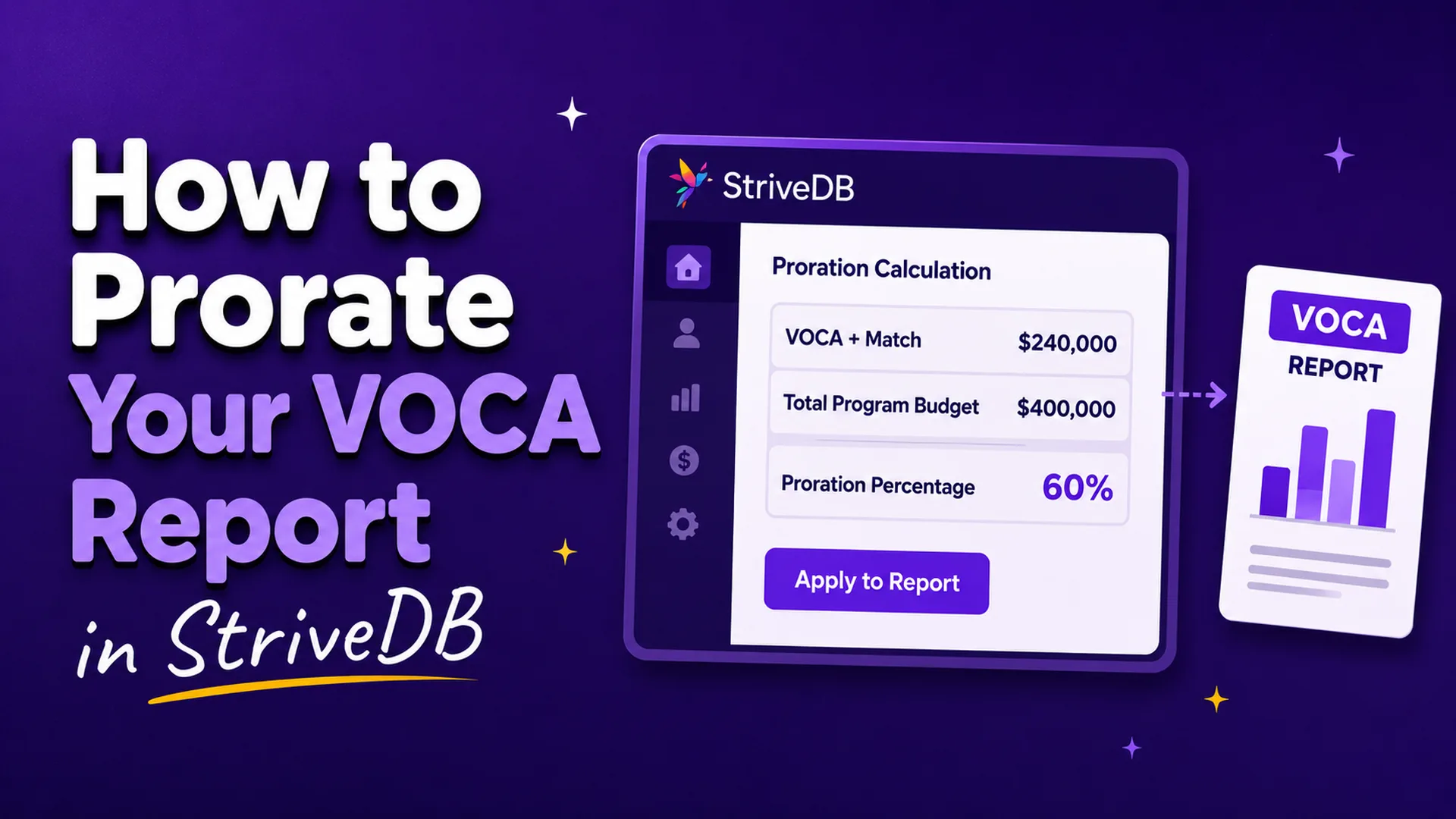
Most centers don't have one funder. You've got VOCA, maybe VAWA, some county money, a United Way grant, and a couple of foundations that each want their own numbers. Your advocates don't ask a survivor which grant is paying before they pick up the phone.
So when the VOCA report comes due, you're stuck on one question. Of everyone we served, how many go on this report?
If you can tell which survivors and which services your VOCA money paid for, report those and you're done. That's what OVC would rather you do. Plenty of centers can't get there, and OVC has published a way to answer the question anyway. It's called "proration," and if you've never heard of it, you're not alone. The good news for center directors: StriveDB can prorate your reports for you automatically.
What is proration, and when does OVC allow it?
VOCA proration means reporting a share of your activity instead of all of it, based on the share of your budget a funder paid for. You can't say which survivors your VOCA dollars served, so you use a proportion you can measure, the share of your budget VOCA funded, and report that share of your people and services.
OVC lays this out in a guidance document called Suggested Prorating Strategies for Victim Assistance Subgrantees, published in Winter 2020 and still current on OVC's Victim Assistance performance measures page.
The starting expectation is still separate tracking. OVC wants data on the survivors and services your Victim Assistance subgrant supported kept apart from what your other funding paid for, and allows proration only when that isn't possible. In that case you work with your state administering agency to apply a prorating strategy, so a reasonable portion of your activity lands on the VOCA report and goes into the Performance Measurement Tool, or PMT.
Your report covers the federal award and the required match together, not the federal share alone. VOCA subrecipients generally have a 20% match requirement, although tribal projects, certain territories, and organizations receiving an approved full or partial waiver may have different requirements. OVC's examples calculate proration using the subaward plus applicable match; confirm the numerator with your state administering agency if your match has been waived or reduced.
Is proration required?
No. OVC's first choice is that you track VOCA-supported activity separately and report exact counts. Proration is what you do when that isn't possible.
Can you report all your clients under VOCA?
Only if VOCA plus match paid for all of them. Otherwise you report the VOCA-supported share, either by tracking it directly or by prorating.
Does the PMT calculate proration for you?
No. The PMT is where prorated numbers get entered, not where they get worked out. OVC expects the proration to happen before PMT entry, either by you or by your state administering agency.
Is there software that will prorate your VOCA report?
Yes. StriveDB works out your VOCA proration percentage from the budget you've entered, applies it to your counts, and prints the arithmetic on the report itself.
What we kept hearing is that centers were losing hours to this every quarter. The math was happening in a spreadsheet on somebody's laptop, and six months later nobody could reconstruct it. The spreadsheet tends to live on one person's computer, and when that person leaves, the explanation leaves with them.
So we built the calculation into the VOCA performance measures report, along with the record of how it was computed. Because your grants, budgets, clients, services, and reports already sit in the same system, proration is a setting on a report rather than another spreadsheet to maintain. The percentage comes from budget figures you entered once, applied to service records your advocates already logged.
StriveDB implements all three of OVC's options, computes the percentage, and shows its work. It doesn't certify that your method is defensible or approve your reasoning. Choosing a method and standing behind what you submit stays with you.
As of July 2026, we couldn't find another case management system built for victim service providers that publicly documents built-in VOCA proration.
What are the three prorating options OVC allows?
Each option is a ratio. VOCA dollars plus match, divided by a larger total. You apply the resulting percentage to your people served, your services provided, and each demographic count. What changes between the options is which total sits in the denominator.
| Option | The ratio | When you use it | OVC's example |
|---|---|---|---|
| 1. Staff salary | VOCA staff salary divided by total staff salary | You have total counts but can't tie them to a funder, and you can tie salary to VOCA | $50,000 of $62,500, or 80 percent |
| 2. Direct victim services budget | VOCA direct services dollars divided by your total direct services budget | You can separate direct service funding from outreach, training, and other work | $62,500 of $83,000, or 75 percent |
| 3. Total victim services program budget | VOCA subaward plus match divided by your whole victim services program budget | You can't break out direct services, but you know your program budget | $80,000 of $115,000, or 70 percent |
OVC's example runs a $115,000 victim services program with $80,000 from VOCA plus match, using the same 100 people served and 200 services provided throughout so the options can be compared. Option 1 reports 80 people and 160 services. Option 2, 75 and 150. Option 3, 70 and 140.
The options are ranked. OVC says the strategies are listed in order of desired use, and if you can't track at the level Option 1 describes, you move to Option 2, then to Option 3. So this isn't a menu you pick from on preference. You use the most precise one your records can actually support.
Option 1 has a variation. If you can identify which survivors your subgrant supported but not which services, report your people precisely and prorate only the services. And if your center runs unrelated programs, a food pantry or an after-school program, Option 3 uses only the victim services budget, not your whole center's.
A broader option won't reliably give you a bigger percentage. It depends on the shape of your budget. A funder carrying most of your rent and utilities can come out larger under Option 3 than Option 2, and a funder weighted toward salaries can come out larger under Option 1 than either. Run your own numbers.
How the three options map to your grant budget
Proration is arithmetic on a budget, so StriveDB needs to know your budget. That setup lives in the Settings area, under Grants, and it's the part that actually determines whether your percentage holds up. You do it once per grant period, not once per report.
There are three steps.
- Create one grant record for your victim services program, with a short code, a title, and a start and end date.
- Add a funding source for each money stream: VOCA, a state award, a county allocation, a foundation grant.
- Enter each funding source's budget line by line, filing every line under exactly one of three categories: Staff Salary, Direct Victim Services, or Other.
Those three categories are the three options. Option 1 counts Staff Salary. Option 2 counts Staff Salary and Direct Victim Services. Option 3 counts all three. So the care you take filing a line item is the care that shows up in your percentage, and a salary line filed under Other will quietly change your Option 1 result.
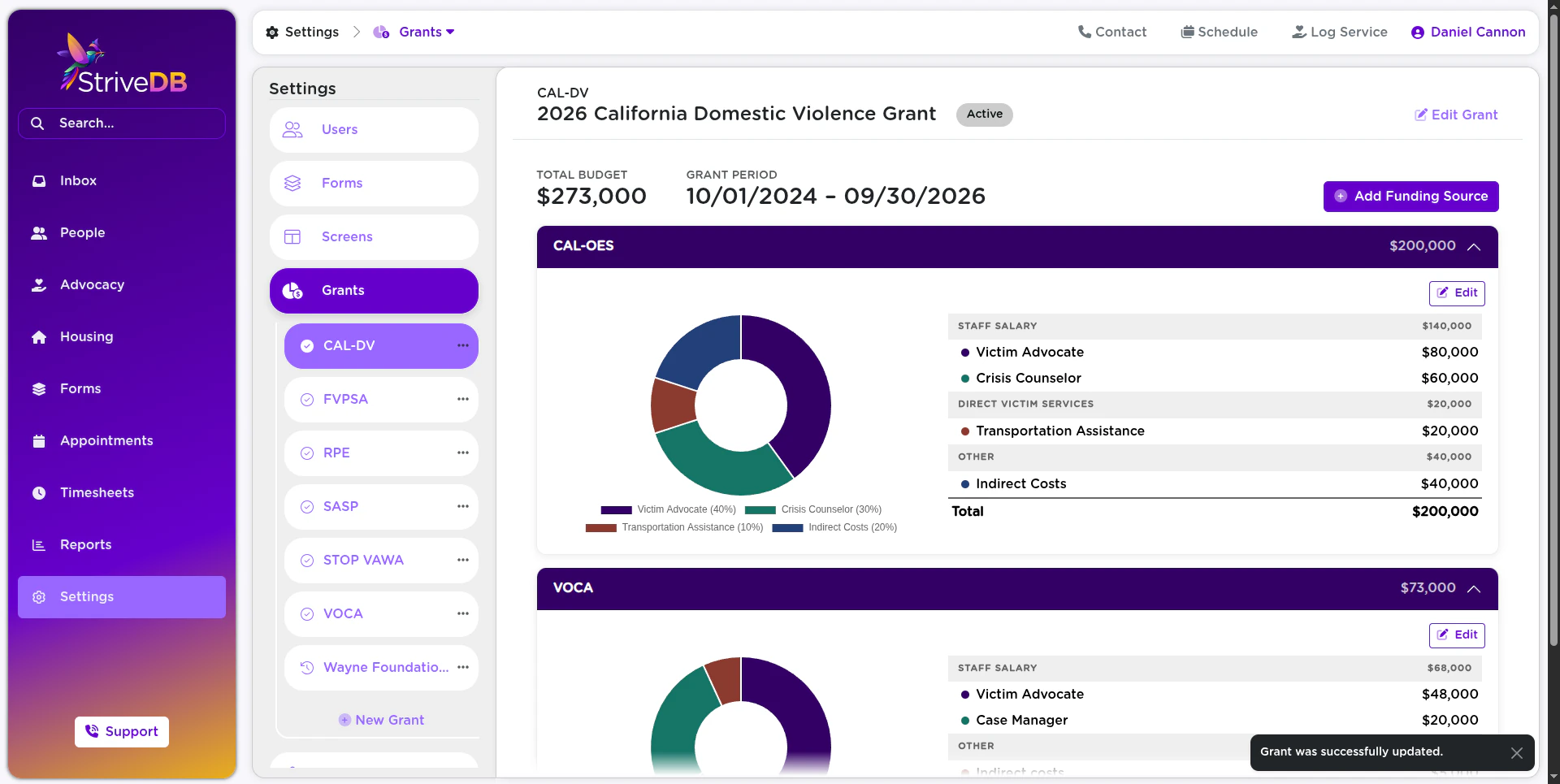
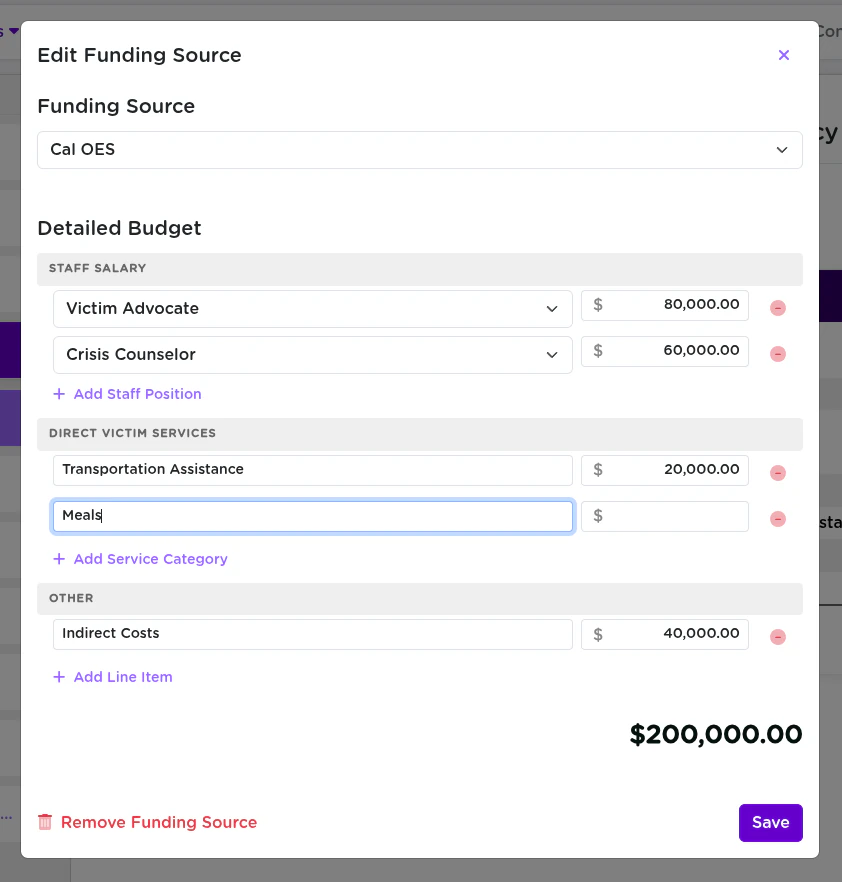
One setup mistake to avoid. Model your victim services program as one grant with every funding source attached to it. If you create a separate grant record for each funder, the denominator only ever holds that one source, your percentage comes out at 100, and proration does nothing for you.
Turning proration on
Proration is configured on the VOCA performance measures report itself.
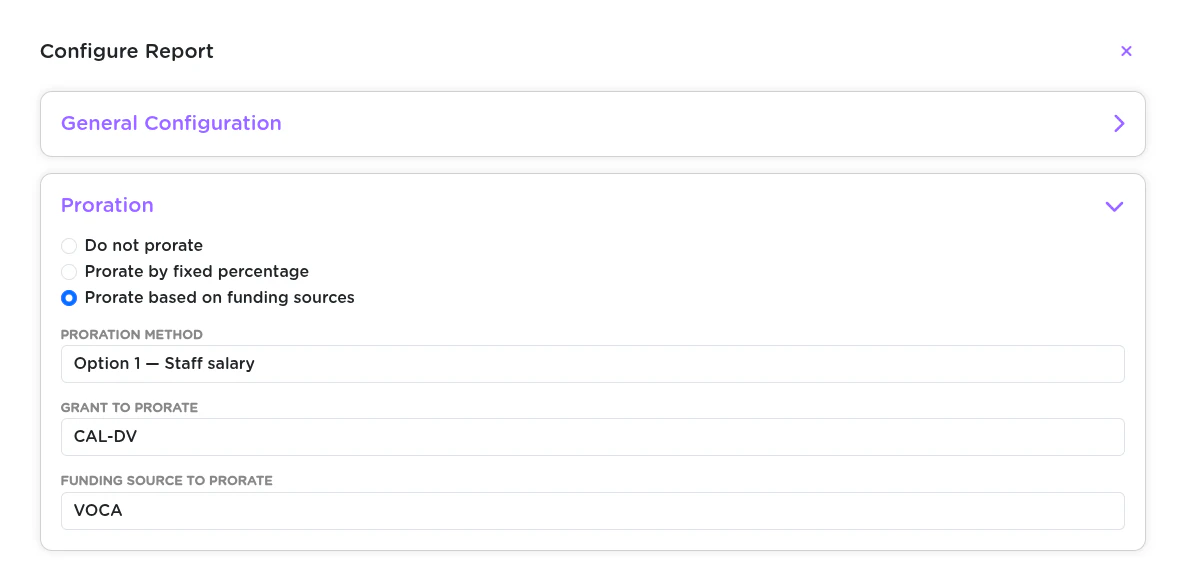
- Open the report and choose Configure Report.
- Find the Proration section.
- Pick one of three modes.
Do not prorate is the default. Your report shows raw counts and nothing changes.
Prorate by fixed percentage asks for a number and a justification. This one exists on purpose. Some centers have a percentage already worked out with their state administering agency, some have a funding structure the budget ratio doesn't model cleanly, and some are mid-migration with budgets not yet entered. Rather than push them into a computation that doesn't fit, we let them state the number and record why. The justification is your own text: we don't suggest language for it, and we don't check that it supports the number.
Prorate based on funding sources is the computed option. You pick a method, a grant, and which funding source's share you're reporting. StriveDB works the percentage out from the budget you already entered.
If you report the same period to more than one funder, you can clone the report and give each copy its own proration settings. Cloning is something our support team does for you. Configuring the copy afterward is yours.
The length of the reporting period does not change the formula. However, the numerator and denominator must cover the same applicable budget period, and you should recalculate after budget amendments or changes in funding.
How do you document VOCA proration for monitoring or an audit?
The derivation prints on the report. A prorated StriveDB report states the percentage, names the method behind it, shows the budget figures it came from, and links every prorated number to its own calculation.
You'll need that, because your state administering agency is going to look. Under 28 CFR 94.106 and OVC's subrecipient monitoring guidance, state agencies have to conduct regular desk monitoring of every subrecipient and on-site monitoring at least once every two years, unless their monitoring plan sets a different risk-based schedule. That's not the same as an audit, which is a separate financial examination triggered at a much higher spending threshold. Monitoring is the routine one, and it looks at your performance data.
OVC only encourages you to put your prorating method in writing. It doesn't require it. But the PMT User Guide does require you to maintain documentation of the survivors served and services provided that supports what you reported, and 2 CFR 200.334 requires you to keep those records, statistical records included, for three years after your final financial report. Some states go further. Kentucky asks subgrantees to state in the PMT comments whether a proration strategy was applied. Coalitions differ too, so ask yours what it expects.
So the method is optional to document and the numbers behind it are not. That gap is why we put the derivation on the report instead of leaving it in an email.
A prorated report opens with a banner headed Proration Applied, stating that all counts have been multiplied by your percentage to reflect the funded share. In fixed-percentage mode it prints your justification underneath, so your reasoning travels with the report. In funding-sources mode it names the funding source and the grant, spells out which option was used, and prints the whole budget matrix, with the selected funding source's column highlighted.
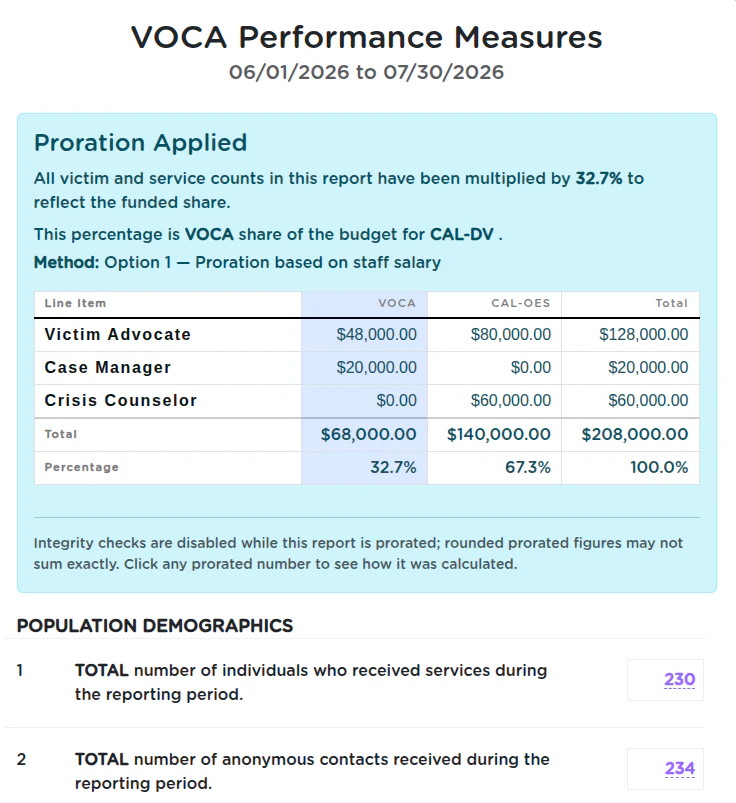
Every prorated number on the report is clickable. Click one and you get the calculation for that specific figure, and where the number represents a set of records, the count links through to the records themselves.
Which means someone reviewing your report can go from a number on a federal form, to the arithmetic behind it, to the actual client records, without asking you for a spreadsheet from ten months ago.
Work out your own proration percentage
If you came here looking for a VOCA proration worksheet or a template to fill in, this is that. Enter your budget figures, pick a method, and the calculator shows your percentage and what you'd report. Nothing is saved and nothing leaves your browser.
VOCA Proration Calculator
See where your numbers land
Enter your budget figures and totals once. Then toggle the three OVC methods to compare what each one would have you report.
Your budget
Your totals (all funding)
Show method
Enter the two figures for the selected method to see your prorate percentage and reported counts.
How StriveDB fits in. StriveDB runs this calculation from the grant budget you have already entered, applies it to your VOCA performance measures report, and prints the derivation alongside the numbers so your method is documented. This calculator is for illustration and does not store anything you type.
Try the same budget under all three options before you settle on one. Directors are often surprised by the ranking, and it's better to be surprised here than after you've submitted.
If you'd rather work through it with your own grant budget in front of you, talk to us and we'll do it together.
Talk to usWhen can you skip proration entirely?
If you can identify the survivors and services your subgrant plus match supported, you report those exact counts and you don't prorate. OVC's guidance covers this case before it gets to the three options: a program that can point to precisely 80 people and 160 services its VOCA money supported reports 80 and 160. No percentages, nothing to reconstruct later.
That's the better place to be, and it's worth aiming for. StriveDB tracks services to funders directly, so it's reachable. Every service record can carry the grant it counts under, and service codes can fill that in by default. You can also specify a funder when a client is enrolled with a provider, and track services by grant and funding source together.
None of this is extra work for advocates. They log a service the way they always have, and the funding source comes along with the service code. There's no second system to update, no funder field to remember at the end of a long day, and nothing to reconcile at quarter close.
Some other systems in this category are built around the same idea, attributing service time to the correct funding source at the moment services are delivered so that nothing has to be matched up afterward. It's a good approach and we agree with it.
That's where we've landed. Track precisely if you can, because it's cleaner and OVC prefers it. Prorate when you can't. The same system should do both, and now ours does.
What proration doesn't do
Proration scales the survivor and service counts on your VOCA performance measures report. It doesn't touch financial reporting, drawdown, or match calculations, and it isn't applied to your other reports.
It's a program-level share, not a claim about individual people. Proration doesn't say that these 80 survivors were the VOCA ones. It says 80 percent of the capacity that served everyone was VOCA-funded, so 80 percent of the activity is what you report. That distinction matters if anyone ever asks you to explain the number.
Volunteer figures aren't prorated. Those go in as whole numbers.
The check marks that normally confirm your subtotals add up switch off while a report is prorated. Rounded parts don't always sum, and flagging correct math as an error would teach people to ignore a check that matters the rest of the time.
And if a proration setting is half configured, the report refuses to run and tells you what's missing. A report that was supposed to be prorated but quietly printed raw numbers is worse than one that doesn't print, because raw numbers look finished and somebody will submit them.
The percentage is only as good as the budget behind it. We print the full matrix so a miscategorized line is visible instead of buried, but we can't tell that a salary got filed under Other.
VOCA proration at a glance
- OVC prefers separate tracking. Prorate only when you can't track VOCA-supported activity separately.
- There are three approved methods, ranked in order of preference: staff salary first, direct victim services budget second, total victim services program budget third.
- Use the most precise method your records support, not the one that produces the best number.
- The percentage is your VOCA subgrant plus match divided by a larger total.
- Apply it to people served, services provided, and each demographic count.
- Volunteer figures are not prorated and go in as whole numbers.
- OVC encourages a written method. Keeping the records behind your reported numbers is required, for three years.
- Confirm expectations with your state administering agency and your coalition before you choose.
Frequently asked questions
Does my state or my coalition change the rules?
Mostly not the method. States generally point you back to OVC's three options. What varies is whether your state prorates on your behalf or expects you to do it, whether it wants the method disclosed, as Kentucky does, and whether it expects documentation of how you allocate shared costs.
Coalitions vary too. Some ask their member centers to prorate, and others tell them not to. Ask both your state administering agency and your coalition before you settle on an approach, and ask early enough that you aren't changing course the week a report is due.
How do I round a fractional prorated number?
OVC doesn't publish a rounding rule, and the PMT takes whole numbers. Ask your state administering agency what convention they expect before you enter a fractional result.
Can I switch methods between reporting periods?
OVC's guidance doesn't address it. Since the options are ranked by how precisely you can track, a center whose records improve would reasonably move up, but that's a reading rather than a stated rule. Ask your state agency first.
Can other case management systems prorate a VOCA report?
When we reviewed publicly available product documentation across this category in July 2026, we didn't find proration described as a named feature by any other provider. That's a statement about what vendors publish, not a claim about what their products can do internally, so ask directly if you're evaluating one. Several systems approach the same problem from the other end, attributing each service to a funding source when it's delivered, which removes the need to prorate at all.
Related reading
- Why the Largest Rape Crisis Center in New Mexico Uses StriveDB
- Bonterra Apricot alternatives for DV and SA centers
- What zero-knowledge encryption means for a victim services database
Talk to us
If reporting season is taking a weekend out of every quarter, we'd like to help. Proration is live on every StriveDB plan right now, so if you're already with us, you can set up your grant budget and turn it on today, and our team will walk through it with you if you'd rather not do it alone.
If you're not, talk to our team and we'll run it against your grants and your numbers. Everything here is about your VOCA report; if VAWA and FVPSA reporting are on your list too, that's a longer conversation and one we're glad to have. Either way, you should be able to show where a figure came from.
Talk to our team